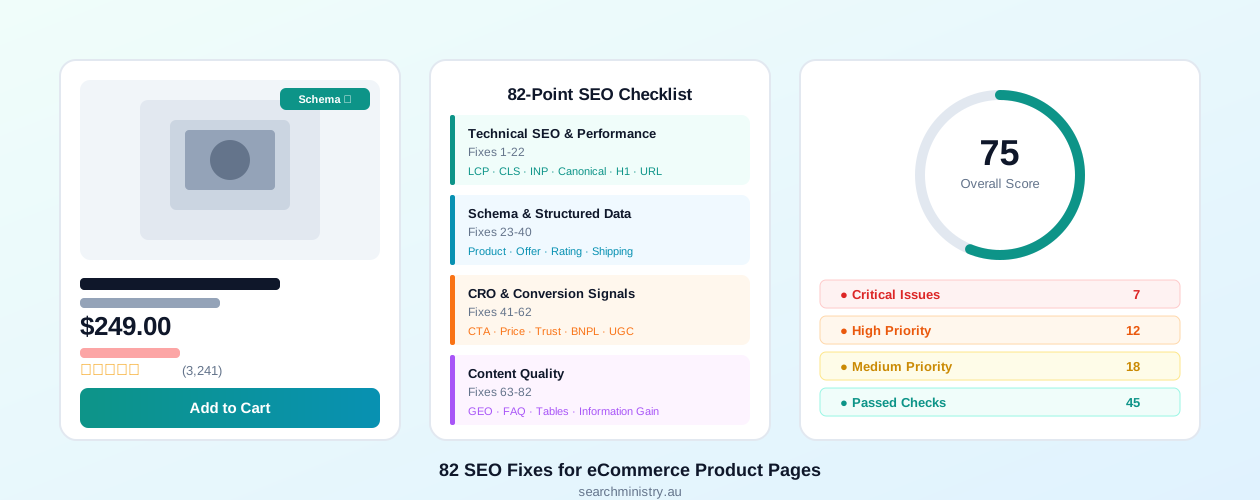
Product pages are the highest-value real estate on any eCommerce site. They are where search intent meets purchase intent, where rankings translate directly into revenue. Yet most online stores leave significant ranking potential on the table through fixable technical issues, missing schema markup, weak content, and poor conversion signals.
This guide covers all 82 optimisation points that matter for product page SEO in 2025-2026. Work through them systematically and you will see measurable improvements in both rankings and revenue.
8%
more conversions
from a 0.1 second improvement in mobile load time for retail sites
Think with Google, 2023. Technical SEO and performance fixes (Fixes 1-22) directly protect and extend this margin.
| Pillar | Fixes | Critical | Top Priority Fix |
|---|---|---|---|
| Technical SEO & Performance | 1-22 | 4 | LCP hero image, canonical tag, H1 structure |
| Schema & Structured Data | 23-40 | 5 | Product schema, Offer schema, Availability |
| CRO & Conversion Signals | 41-62 | 2 | Primary CTA above fold, price prominence |
| Content Quality | 63-82 | 1 | Information gain, AI-ready summary (GEO) |
Run Your Free Product Page Audit First
Before working through the list manually, use our free tool to get an instant automated report on any product page. The E-Commerce Product Page SEO Checker analyses your page against all 82 checkpoints and returns a scored report with specific findings, code snippets, and prioritised recommendations. It takes less than 60 seconds and requires no sign-up. For category and collection pages, the E-Commerce Category Page SEO Checker runs a dedicated 75-point audit.
Technical SEO & Performance (Fixes 1-22)
Technical issues are the most damaging category because they affect whether Google can find, crawl, render, and rank your pages at all. Fix these before investing time in content or conversion improvements.
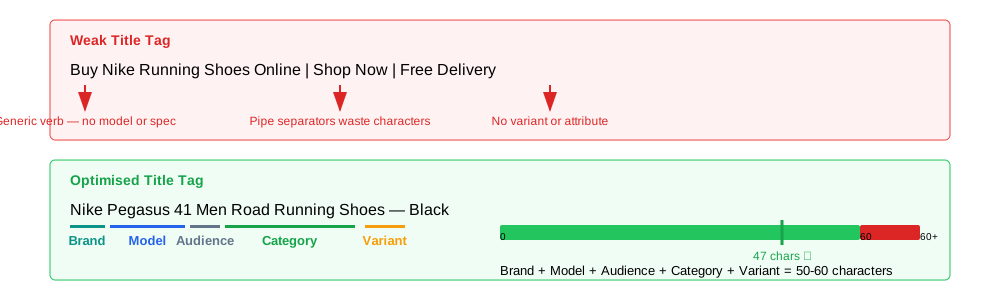
Fix 1: Rewrite Your Title Tag Using the Right Formula
Title tags should be 50-60 characters following this formula: [Brand] + [Model/Series] + [Primary Category] + [Key Variant]. Front-load your primary keyword and differentiate variant titles to prevent cannibalisation.
<!-- 59 chars but zero product signal -->
<title>Buy Nike Running Shoes Online | Shop Now | Free Delivery</title>
<!-- Brand + Model + Audience + Category + Variant -->
<title>Nike Pegasus 41 Men Road Running Shoes - Black</title>
Fix 2: Write Meta Descriptions That Work for Both Humans and AI
Target 140-155 characters. Use the formula: [Benefit Hook] + [Primary USP] + [Secondary Offer] + [Soft CTA]. The first 100 characters should standalone as a complete product summary because AI Overviews extract the opening of meta descriptions. Never duplicate the same meta description across product variants.
<!-- Formula: [Benefit] + [USP] + [Offer] + [Soft CTA] | 152 chars -->
<meta name="description" content="Smooth responsive ride for daily training. Air-cushioned midsole, breathable mesh. Free AU shipping over $75. Shop Nike Pegasus 41 in all sizes.">
Fix 3: Ensure Exactly One H1 Per Product Page
Every product page must have exactly one H1 containing [Brand] + [Model] + [Primary Category] + [Key Attribute]. A common bug on Shopify and WooCommerce stores is the site logo being wrapped in an H1 tag, replacing your primary keyword signal with a decorative image.
<h1><a href="/"><img src="/logo.svg" alt="Store Name"></a></h1>
<h2>Nike Pegasus 41 Men Road Running Shoes</h2> <!-- wrong level -->
<!-- Logo in normal div, product name in H1 -->
<div class="logo"><a href="/"><img src="/logo.svg" alt="Store Name"></a></div>
<h1>Nike Pegasus 41 Men Road Running Shoes - Black</h1>
Fix 4: Optimise Your Hero Product Image for LCP
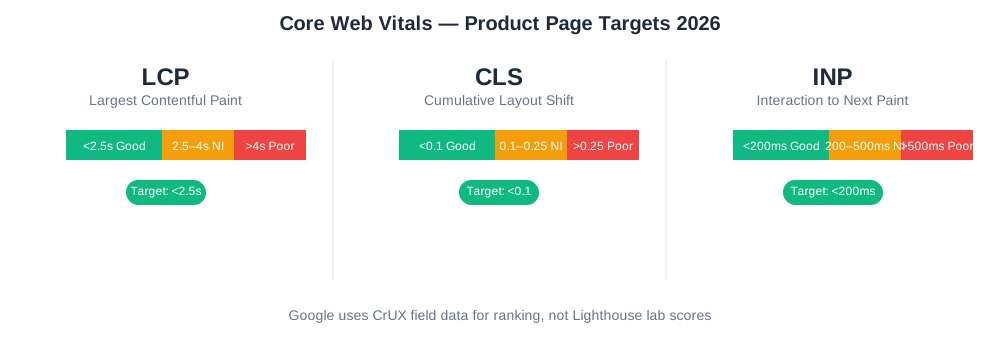
Largest Contentful Paint should be under 2.5 seconds. For product pages, the LCP element is almost always the hero product image. Add fetchpriority="high" and decoding="async" to the hero image element. Never apply loading="lazy" to the LCP image.
<!-- In <head>: preload LCP image before browser discovers it -->
<link rel="preload" as="image"
href="/images/nike-pegasus-41-hero.webp"
fetchpriority="high">
<!-- Hero image: fetchpriority, no lazy, explicit dimensions -->
<img src="/images/nike-pegasus-41-hero.webp"
alt="Nike Pegasus 41 Men Road Running Shoes in Black, side view"
width="1200" height="1200"
fetchpriority="high"
decoding="async"
loading="eager"> <!-- NEVER loading="lazy" on the LCP image -->
Fix 5: Add a Self-Referencing Canonical Tag
Every product page must have a canonical tag pointing to itself as an absolute HTTPS URL. Strip UTM parameters, session IDs, and tracking tokens. Variant pages with search volume deserve their own unique canonicals rather than pointing to the parent.
<!-- Self-referencing, absolute URL, HTTPS, no query params -->
<link rel="canonical" href="https://yourstore.com.au/shoes/running/nike-pegasus-41-black/">
<!-- Wrong: relative URL -->
<link rel="canonical" href="/shoes/running/nike-pegasus-41-black/?utm_source=email">
Fix 6: Audit Your Heading Hierarchy
Headings must flow logically from H1 through H2, H3, and H4 without skipping levels. Common offenders include decorative headings ("Shop the Collection", "You May Also Like") placed in H2 or H3 tags. Promotional text should use styled paragraph elements or divs, not heading tags.
Fix 7: Eliminate Cumulative Layout Shift
CLS should be under 0.1. The most frequent cause is images without explicit width and height attributes. Dynamic banners injected above the fold, carousels without fixed-height containers, and web fonts without font-display: swap all contribute to CLS.
Fix 8: Reduce DOM Size and Depth
Google recommends keeping total DOM nodes under 1,500 with a maximum nesting depth of 32 levels. Page builders (Pagefly, GemPages, Shogun) commonly generate 3,000-8,000 nodes. Audit your DOM in Chrome DevTools under Performance.
| Metric | Good | Warning | Critical |
|---|---|---|---|
| Total DOM Nodes | < 800 | 800-1,500 | > 1,500 |
| Max DOM Depth | < 15 | 15-32 | > 32 |
| HTML Payload (uncompressed) | < 50KB | 50-100KB | > 100KB |
| Total Blocking Time | < 150ms | 150-300ms | > 300ms |
Fix 9: Reduce HTML Document Size
Aim for an HTML payload under 100KB uncompressed. With Brotli compression this should be under 30KB over the wire. The most common source of HTML bloat is inline JSON data for variant pricing and inventory injected by the platform, which can add 150-300KB before the user sees a single product image.
Fix 10: Defer and Async Non-Critical Scripts
Total Blocking Time should be under 200ms. Defer or async all non-critical third-party scripts. Google Tag Manager containers with 30 or more tags add 400-800ms of blocking time. Audit your GTM container and remove unused tags.
Fix 11: Confirm Your Robots Meta Tag Settings
The default for active product pages is index, follow. Out-of-stock products should retain index, follow unless permanently discontinued. Check both the meta tag and the HTTP X-Robots-Tag response header, not just your CMS settings.
Fix 12: Fix Your Viewport Meta Tag
The correct viewport meta is width=device-width, initial-scale=1. Never add user-scalable=no or maximum-scale=1. These prevent zooming, which is an accessibility failure under WCAG 1.4.4 and a negative mobile usability signal.
Warning
Pages that restrict zoom fail Google's mobile usability audit. When Google's crawler detects user-scalable=no, it flags the page as having a mobile usability error in Search Console, which can remove the page's mobile-friendly designation in search results.
Fix 13: Check Mobile Touch Target Sizes
Interactive elements including CTA buttons, variant swatches, and quantity steppers must be at least 44x44 CSS pixels with 8px spacing between adjacent targets. Small swatches cause mis-taps and INP failures.
Fix 14: Serve Images in Modern Formats
Serve AVIF as the primary format with WebP fallback and JPEG or PNG as the final fallback using the <picture> element. Apply loading="lazy" to all images below the fold.
<!-- AVIF primary, WebP fallback, JPEG final. Lazy load below-fold images -->
<picture>
<source srcset="/images/product-angle-2.avif" type="image/avif">
<source srcset="/images/product-angle-2.webp" type="image/webp">
<img src="/images/product-angle-2.jpg"
alt="Nike Pegasus 41 Men Road Running Shoes, rear angle view"
width="800" height="800"
loading="lazy">
</picture>
Fix 15: Strengthen Internal Link Density
Every product page needs breadcrumb navigation with at least two levels, two to three contextual links within the product description, and a related products widget. Orphaned PDPs with fewer than two internal inlinks cannot pass link equity regardless of content quality.
Fix 16: Add Resource Hints
Use preconnect for your CDN origin and font providers. Preload the LCP image and the primary body font. Limit preloads to two or three per page to avoid resource contention.
<!-- Preconnect to CDN and fonts -->
<link rel="preconnect" href="https://cdn.yourstore.com.au">
<link rel="preconnect" href="https://fonts.googleapis.com" crossorigin>
<!-- Preload LCP image and body font -->
<link rel="preload" as="image" href="/images/hero.webp" fetchpriority="high">
<link rel="preload" as="font" href="/fonts/inter.woff2" type="font/woff2" crossorigin>
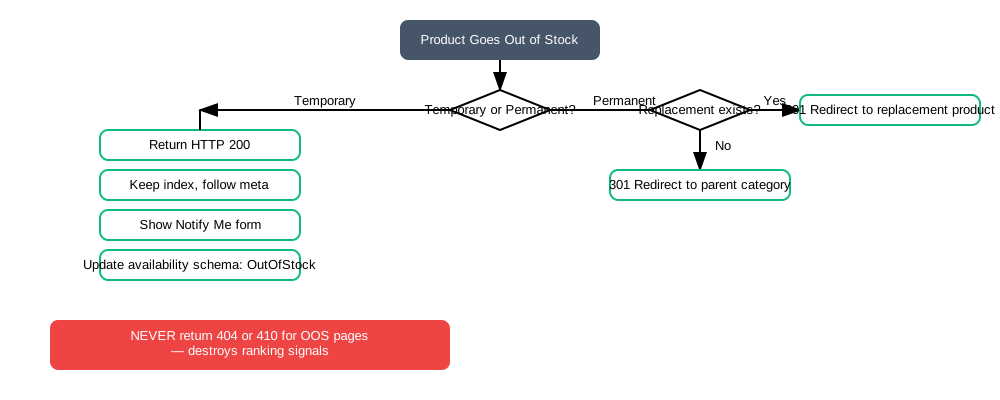
Fix 17: Handle Out-of-Stock Products Correctly
Out-of-stock products must return HTTP 200, never 404. A 404 causes Google to drop the page from the index, destroying accumulated ranking signals. Follow the decision tree below:
Critical
A 404 on a previously ranked product page destroys all accumulated signals: inbound links, crawl priority, and historical ranking data. A page earning 500 organic visits per month can reach zero in under two weeks after returning a 404. Recovery takes months of re-indexing and re-accumulation of authority. Keep every product page live at HTTP 200 regardless of inventory status.
Fix 18: Enforce HTTPS and Security Headers
HTTPS is a confirmed ranking signal. Check for HSTS (max-age=31536000; includeSubDomains; preload), a Content Security Policy, and X-Content-Type-Options: nosniff.
Fix 19: Control Faceted Navigation URLs
Multi-parameter filter URLs create thousands of near-duplicate pages that waste crawl budget. Block them via robots.txt or noindex. Single-filter pages with genuine search volume can be indexed with unique content and canonical URLs.
Fix 20: Improve Your URL Structure
Follow the pattern /category/subcategory/product-slug/. Use hyphens, keep everything lowercase, include the primary keyword in the slug, and keep the full path under 75 characters.
| URL Pattern | SEO Value | Issue |
|---|---|---|
| /shoes/running/nike-pegasus-41-black/ | Excellent | None |
| /products/12847/nike-pegasus/ | Weak | Numeric ID, missing category, no variant |
| /shop?product=nike-pegasus&id=12847&color=black | Poor | Query parameters, session ID risk |
| /Nike_Pegasus_41_Men%27s_Road_Running_Shoes_Black/ | Poor | Underscores, special chars, too long |
Fix 21: Add Product Images to Your XML Sitemap
Product images in an XML image sitemap with image:loc, image:title, and image:caption are more reliably indexed in Google Images. CDN-hosted images need explicit sitemap declaration.
Fix 22: Monitor Core Web Vitals with Field Data
Lab data from Lighthouse and field data from CrUX can differ substantially. Google uses field data for ranking. INP replaced FID in March 2024. Common INP failures on product pages come from variant selector interactions, gallery clicks, and quantity stepper updates.
Schema & Structured Data (Fixes 23-40)
Structured data is the bridge between your page content and Google's Knowledge Graph. Getting schema right unlocks rich results in SERPs and improves how AI systems reference your products. All schema should be implemented as JSON-LD in the document head.
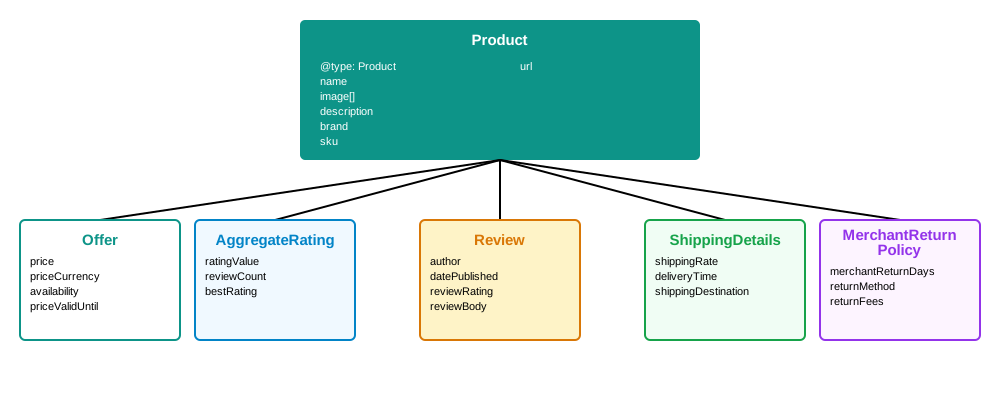
Fix 23: Implement Product Schema with All Required Fields
The minimum required fields for a valid Product schema are: name, image (as an array), description, brand.name, sku, and url. Missing any of these prevents rich result eligibility.
<!-- Complete Product JSON-LD with all required + recommended fields -->
<script type="application/ld+json">
{
"@context": "https://schema.org",
"@type": "Product",
"name": "Nike Pegasus 41 Men Road Running Shoes",
"image": [
"https://example.com/images/pegasus-41-side.jpg",
"https://example.com/images/pegasus-41-top.jpg",
"https://example.com/images/pegasus-41-sole.jpg"
],
"description": "The Nike Pegasus 41 delivers a smooth, responsive ride...",
"brand": { "@type": "Brand", "name": "Nike" },
"sku": "FD2722-001",
"gtin13": "0194955326498",
"mpn": "FD2722-001",
"color": "Black", "material": "Mesh upper, rubber sole",
"url": "https://example.com/shoes/running/nike-pegasus-41-black/"
}
</script>
Fix 24: Add Product Identifiers (GTIN, MPN, SKU)
Include gtin13 (EAN barcode), gtin12 (UPC), mpn, and sku. Google validates GTIN checksums and cross-references your product against its product knowledge base. Each variant needs its own unique GTIN or SKU.
Fix 25: Add a Complete Offer Schema Block
The Offer schema nested inside Product must include price, priceCurrency, availability as a full Schema.org URI, priceValidUntil, itemCondition, and seller. The price must exactly match the visible on-page price.
"offers": {
"@type": "Offer",
"price": "249.00",
"priceCurrency": "AUD",
"availability": "https://schema.org/InStock",
"url": "https://example.com/shoes/running/nike-pegasus-41-black/",
"priceValidUntil": "2026-12-31",
"itemCondition": "https://schema.org/NewCondition",
"seller": { "@type": "Organization", "name": "Your Store" }
}
Fix 26: Add ShippingDetails Schema
OfferShippingDetails triggers the "Free delivery" badge in Google Shopping rich results. Declared delivery times must be accurate and match the page.
"shippingDetails": {
"@type": "OfferShippingDetails",
"shippingRate": { "@type": "MonetaryAmount", "value": "0", "currency": "AUD" },
"shippingDestination": { "@type": "DefinedRegion", "addressCountry": "AU" },
"deliveryTime": {
"@type": "ShippingDeliveryTime",
"handlingTime": { "@type": "QuantitativeValue", "minValue": 0, "maxValue": 1, "unitCode": "DAY" },
"transitTime": { "@type": "QuantitativeValue", "minValue": 2, "maxValue": 5, "unitCode": "DAY" }
}
}
Fix 27: Add Return Policy Schema
MerchantReturnPolicy enables return policy rich result features in Google Shopping. Required fields include returnPolicyCategory, merchantReturnDays, returnMethod, returnFees, and applicableCountry.
Fix 28: Add Pros and Cons Schema for AI Overviews
positiveNotes and negativeNotes inside Product schema are extracted by AI Overviews and ChatGPT when generating product comparisons. This is the highest-impact schema addition for GEO in 2025-2026.
"positiveNotes": {
"@type": "ItemList",
"itemListElement": [
{ "@type": "ListItem", "position": 1, "name": "Responsive cushioning for long-distance runs" },
{ "@type": "ListItem", "position": 2, "name": "Lightweight design at 278g" }
]
},
"negativeNotes": {
"@type": "ItemList",
"itemListElement": [
{ "@type": "ListItem", "position": 1, "name": "Not suitable for trail or off-road running" },
{ "@type": "ListItem", "position": 2, "name": "Higher price than previous Pegasus models" }
]
}
Tip
positiveNotes and negativeNotes are the highest-ROI schema addition for AI citations in 2025-2026. ChatGPT, Gemini, and Google AI Overviews all extract this data when generating "pros and cons" comparison answers. Write specific, quantified notes rather than generic marketing phrases: "Softer landings than the Pegasus 40 at the same weight" outperforms "Great cushioning".
Fix 29: Add AggregateRating Schema
AggregateRating inside Product requires ratingValue, reviewCount, bestRating, and worstRating. The schema rating must exactly match the visible on-page rating. Discrepancies trigger rich result suppression.
Fix 30: Add Individual Review Schema
Nest individual Review objects with author (Person type), datePublished in ISO 8601, reviewRating, reviewBody, and name. Include five to ten reviews. Google looks for author diversity, date spread, and rating variation. A perfect 5.0 from hundreds of reviews is a spam signal.
Fix 31: Add BreadcrumbList Schema
BreadcrumbList replaces the raw URL in search results with a clean navigation path. The itemListElement array must mirror your visible breadcrumb trail. The last item (current page) should omit the item URL property per Schema.org.
Fix 32: Add FAQPage Schema with Product-Specific Questions
FAQPage schema enables expandable Q&A pairs in search results. Include four to eight product-specific questions sourced from customer support logs and Search Console queries.
{
"@context": "https://schema.org",
"@type": "FAQPage",
"mainEntity": [{
"@type": "Question",
"name": "Does the Nike Pegasus 41 fit wide feet?",
"acceptedAnswer": {
"@type": "Answer",
"text": "Yes. The Pegasus 41 features a wider toe box than the 40..."
}
}]
}
Fixes 33-39: Additional Schema Types
Additional schema types to implement where applicable: VideoObject (Fix 33) for product videos, color/material/pattern properties (Fix 34), hasEnergyConsumptionDetails for appliances (Fix 35), dynamic availability URI updates (Fix 36), isRelatedTo for semantic product connections (Fix 37), AggregateOffer for variant price ranges (Fix 38), and PeopleAudience for apparel and toys (Fix 39).
| Schema.org Availability URI | When to Use |
|---|---|
| https://schema.org/InStock | Product is available for purchase now |
| https://schema.org/OutOfStock | Temporarily unavailable but keep indexed |
| https://schema.org/PreOrder | Available for purchase before release date |
| https://schema.org/BackOrder | Can order but fulfilment is delayed |
| https://schema.org/Discontinued | Permanently discontinued, then 301 redirect |
Fix 40: Audit Review Schema Authenticity
Reviews used in schema must come from real customers. Self-authored, affiliate, or incentivised reviews violate Google's policies. Violations result in a site-wide manual action removing all review rich results, not just those on the offending pages.
Critical
A review schema manual action removes star ratings from every page across your entire site, not just the offending product. Recovery requires removing all non-compliant reviews, correcting your schema, submitting a reconsideration request, and waiting 6-8 weeks for Google review. Stores that rely on review rich results for CTR see immediate traffic drops when manual actions are applied.
CRO & Conversion Signals (Fixes 41-62)
Google increasingly uses engagement and conversion signals as ranking inputs. A product page that converts well signals relevance and quality. These fixes improve both revenue and ranking position simultaneously.
Fix 41: Place Your Primary CTA Above the Fold
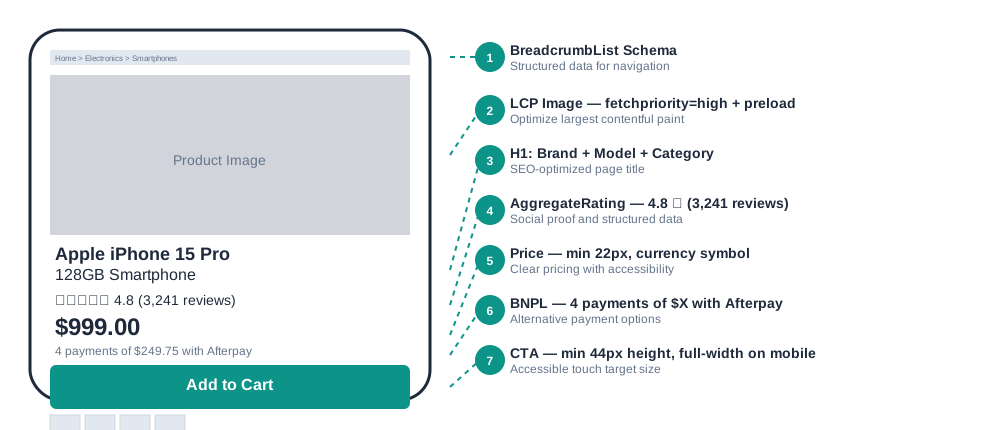
The purchase button must be visible without scrolling on both mobile and desktop. Minimum height of 44px, full width on mobile, high contrast. Valid CTAs include "Add to Cart", "Add to Bag", "Buy Now", "Add to Basket", and "Pre-Order". Ambiguous labels like "Go" or icon-only buttons cause hesitation and abandoned sessions.
Fix 42: Add a Sticky Add-to-Cart Bar on Mobile
When the primary CTA scrolls out of view on mobile, a sticky bar fixed to the bottom of the viewport should appear. Include the product name, current price, variant summary, and an Add to Cart button. Stores that implement sticky CTAs report measurable increases in mobile conversion without any content changes.
Fix 43: Make the Price Visually Prominent
Price text must be at least 22px on mobile and 24-28px on desktop, positioned below or adjacent to the H1, above the fold. For sale pricing, show the original price struck through, the reduced price in an accent colour, and a "Save $X" badge.
Fix 44: Add Real-Time Scarcity Indicators
Inventory-accurate signals like "Only 3 left" create genuine urgency only when dynamically linked to live inventory. Static or fabricated scarcity claims risk ACCC action under Australian consumer law. Variant-level scarcity (e.g. "Only 2 left in Size M") is more effective than product-level signals.
Warning
Under the Australian Consumer Law, static scarcity messages that do not reflect actual stock levels constitute misleading conduct. The ACCC has issued infringement notices and penalties against Australian retailers for artificial urgency tactics. Always render scarcity signals from live inventory data, and remove them when stock is above your urgency threshold.
Fix 45: Display Trust Badges Adjacent to the CTA
Place SSL badge, payment method logos (Visa, Mastercard, PayPal, Apple Pay), money-back guarantee, and "Authorised Retailer" badges directly below or beside the Add to Cart button. Payment logos reduce payment anxiety, the most common subconscious barrier to completing a purchase.
Fix 46: Show Buy Now Pay Later Options Near the Price
Display the instalment amount near the price: "4 payments of $62.25 with Afterpay". Position below price, above the CTA. BNPL messaging increases average order value by making higher-priced products feel more accessible.
| AU BNPL Provider | Structure | Best For |
|---|---|---|
| Afterpay | 4 fortnightly payments, 0% interest | Fashion, beauty, lifestyle |
| Zip Pay | Line of credit up to $1,000 | Everyday purchases |
| Zip Money | $1,000-$50,000 interest-free period | High-ticket items |
| Klarna | Pay in 4, Pay in 30 days | Fashion, electronics |
| Latitude Pay | 10 weekly payments, 0% interest | Appliances, electronics, furniture |
Fix 47: Increase Product Image Count and Quality
Aim for six to eight images: hero, multiple angles, lifestyle context, detail close-up, scale reference, and in-use shot. The hero image should be at least 1200x1200 pixels for zoom functionality on desktop.
| Image Type | Minimum Spec | Purpose |
|---|---|---|
| Hero / Front | 1200x1200px, AVIF+WebP | LCP element, first impression |
| Additional Angles | 800x800px+, lazy-loaded | Build confidence, reduce returns |
| Lifestyle / In-Use | 1260x840px, real context | Aspirational purchase trigger |
| Detail / Close-Up | 800x800px+, zoom-capable | Material, texture, finish quality |
| Scale Reference | Standard product + object | Eliminates sizing uncertainty |
| Packaging / Unboxing | 800x800px+ | Sets delivery expectations |
Fixes 48-57: UX and Engagement Signals
Review filtering and sorting (Fix 48): Filter by star rating, sort by recency, helpfulness, and verified purchase. UGC (Fix 49): Allow customer photo uploads at review submission. Shipping display (Fix 50): Show delivery timeframes on the product page before checkout. Returns display (Fix 51): Visible returns policy increases conversion 15-25% for new customers. Cross-sell widgets (Fix 52): "Frequently Bought Together" below the CTA converts best. Exit-intent (Fix 53): Trigger on mouse departure, frequency cap once per session. Accessibility (Fix 54): WCAG 2.1 compliance, 4.5:1 contrast ratio minimum. Micro-interactions (Fix 55): Add to Cart loading state, wishlist heart animation. Live chat (Fix 56): Bottom-right placement, trigger after 30-45 seconds. Wishlist (Fix 57): Guest wishlist via cookie, no forced account creation.
Fix 58: Use Accordions for Supporting Content Sections
Organise secondary content into accordions: Specifications, Shipping Details, Returns, Size Guide, and Warranty. Accordion headers must be <button> elements for keyboard accessibility. Google indexes content inside collapsed accordions.
<!-- Accessible accordion using HTML details/summary -->
<details class="border rounded-lg mb-2">
<summary class="p-4 font-semibold cursor-pointer flex justify-between">
Specifications
<span aria-hidden="true">+</span>
</summary>
<div class="p-4 border-t">
<!-- Spec table content here -->
</div>
</details>
Fixes 59-62: Social Proof, Forms, Personalisation, and INP
Social proof count (Fix 59): Show "4.8 stars (3,241 reviews)" near the H1 or price. Only show when you have 10 or more reviews. Form field labels (Fix 60): All fields need explicit labels, not placeholder-only. Recently Viewed carousel (Fix 61): Six to ten products using cookie or localStorage. TTI and INP (Fix 62): TTI under 3.8s, INP under 200ms. Common failures come from variant selector lag and Add to Cart API latency.
Content Quality (Fixes 63-82)
Content quality is the most nuanced category and the most significant differentiator in competitive product categories. These fixes address what separates product pages that rank and convert from those that merely exist.

Fix 63: Add Original Information the Manufacturer Does Not Provide
Your product page should contain at least 20% content not available on the manufacturer's product sheet or your competitors' pages. Real-world performance data, independent comparisons, installation guidance, compatibility notes for the Australian market, and customer-derived insights all qualify. Manufacturer spec re-hashes score zero on information gain.
Fix 64: Map and Cover the Full Semantic Entity Set
Every product category has a predictable set of semantic entities that searchers expect a comprehensive page to address. For a running shoe: midsole technology, upper material, drop height, pronation type, terrain suitability, fit characteristics, and comparable models. Audit the top five ranking competitors and identify entity gaps in your content.
Fix 65: Write a 50-80 Word AI-Ready Product Summary
Place a 50-80 word conversational product summary before your specification details. This is the primary content block that large language models extract when generating AI Overview summaries and product recommendation responses.
Fix 66: Meet Minimum Product Description Length
Product description length should scale with category competitiveness.
| Category Type | Min Words | Examples |
|---|---|---|
| Low competition / simple product | 300+ | Accessories, consumables, basic apparel |
| Moderate competition | 500-800 | Footwear, homewares, sporting goods |
| High competition | 800-1,200 | Running shoes, laptops, cameras, supplements |
| Technical / high-value | 1,200+ | Appliances, medical devices, professional equipment |
Fix 67: Rewrite Your Bullet Points to Lead with Benefits
Use five to seven bullet points with a maximum of fifteen words each. Apply the formula: [Benefit outcome] + [Feature that delivers it] + [Context or proof]. Test every bullet against the "So what?" question.
- React foam midsole technology
- Engineered mesh upper construction
- 10mm heel-to-toe drop
- Rubber outsole with waffle traction pattern
- Softer landings on long runs thanks to React foam cushioning
- Stays cool during high-intensity sessions with breathable engineered mesh
- Natural heel-to-toe transition at 10mm drop suits neutral runners best
- Reliable grip on wet roads and bitumen from the waffle rubber outsole
Fix 68: Add a Comparison Table
A comparison table showing your own product range (entry vs mid vs premium) is one of the most powerful content additions for both SEO and conversion. Use a real HTML <table> with scope attributes. Large language models extract data from HTML tables at a higher rate than from prose.
| Feature | Pegasus 41 | Vomero 18 | Alphafly 3 |
|---|---|---|---|
| Best For | Daily training | Long easy runs | Race day |
| Stack Height | 33mm / 23mm | 36mm / 26mm | 40mm / 32mm |
| Weight | 278g | 310g | 230g |
| Carbon Plate | No | No | Yes |
| Terrain | Road | Road | Road |
| Price (AUD) | $249 | $289 | $369 |
Fix 69: Build a Product-Specific FAQ Section
Include five to ten questions that address actual buyer concerns about this specific product. Source from your support inbox, Search Console queries, and People Also Ask results. Answers should be 50-150 words and address the specific product, not generic store policies.
Fix 70: Improve Readability
Target Flesch-Kincaid Grade 7-9. Keep average sentence length under 20 words. Write paragraphs of two to four sentences. Structure your content in layers: benefits in accessible language first, features second, specifications in a data table third.
Fix 71: Add a USP Icon Block
A row of three to five icons with two to four word labels near the CTA reinforces purchase confidence. High-converting AU USPs: "Free AU Shipping", "2-Year Warranty", "Authorised Retailer", "30-Day Returns", "100% Authentic". Use SVG icons in a consistent style.
Fix 72: Add Video Transcripts
Every product video needs a full text transcript in a collapsed accordion below the video. Transcripts make video content crawlable and are required under WCAG 1.2.1 for pre-recorded audio and video content.
Fix 73: Add Local Availability and Geo-Specific Signals
"Available at Melbourne CBD store", postcode-based delivery estimates, and Click and Collect availability help product pages rank for "[product] [city]" queries. These signals are a significant competitive advantage against pure-play online retailers.
Fix 74: Add Content Freshness Signals
Show "Last Updated: March 2026" near the product description. Update "Top Rated 2026" badge text annually. Update the dateModified property in your schema whenever you make substantive content changes.
Fix 75: Add a "Not Suitable For" Section
Explicitly stating what a product is not designed for builds trust, reduces returns, and creates GEO citation value. Frame it as expert guidance and link to the correct product. This aligns with ACCC consumer law requirements around accurate product representation.
Example: "Not suitable for" section
Not recommended for:
- Overpronators who need motion control support
- Trail, gravel, or off-road running surfaces
- Runners with plantar fasciitis requiring zero-drop footwear
If you pronate, see our guide to stability running shoes instead.
Fix 76: Use Descriptive Internal Link Anchor Text
Replace generic anchors ("click here", "read more") with keyword-rich descriptive text ("View our complete Nike running range"). Contextual links in body content pass more topical signal than navigation links.
Fix 77: Add a Social Sentiment Summary
A two to three sentence editorial summary of aggregate review sentiment placed above the review section is highly cited by AI systems. Write in third person, include specific quantified claims, and acknowledge the most common criticism honestly.
Fix 78: Optimise for Voice Search and Conversational Queries
Format FAQ headings as natural language questions and use conversational phrasing in descriptions to match how people speak queries. FAQPage schema combined with conversational content is the primary optimisation layer for voice search intent.
Fix 79: Write Unique Alt Text for Every Product Image
Use the formula: [Product Name] + [Attribute] + [Context] for every image. Decorative images get alt="".
alt="Product image 1"
alt="IMG_8823"
alt="shoe"
alt="Nike Pegasus 41 Men Road Running Shoes in Black, side profile view"
alt="Nike Pegasus 41 outsole showing waffle rubber traction pattern, bottom view"
alt="Nike Pegasus 41 worn by male runner on road surface, lifestyle shot"
Fix 80: Add How-To or Setup Instructional Content
An embedded "Getting Started" guide with numbered steps and photos captures secondary informational intent from researchers still evaluating a purchase. Link to a dedicated how-to hub from the product page for categories with complex setup or use cases.
Fix 81: Add a Structured Specifications Table
Present technical specifications, dimensions, materials, and compatibility in a structured HTML table with scope attributes and a <caption> element. A well-structured specs table signals content completeness to both Google and AI systems.
<!-- Accessible spec table with scope and caption -->
<table>
<caption>Nike Pegasus 41 Technical Specifications</caption>
<tbody>
<tr><th scope="row">Weight</th><td>278g (US Men's 9)</td></tr>
<tr><th scope="row">Stack Height</th><td>33mm heel / 23mm forefoot</td></tr>
<tr><th scope="row">Drop</th><td>10mm</td></tr>
<tr><th scope="row">Midsole</th><td>React foam with full-length Air unit</td></tr>
<tr><th scope="row">Upper</th><td>Engineered mesh, recycled polyester</td></tr>
<tr><th scope="row">Outsole</th><td>Rubber, waffle traction pattern</td></tr>
</tbody>
</table>
Fix 82: Build a Relevant Related Products Section
A "You may also like" section with four to eight products, each showing an image, name, star rating, price, and Add button. Keep recommended products within a 30% price floor and ceiling of the current product to serve the realistic budget of the current visitor.
Audit Your Product Pages Against All 82 Checks
Run any product page URL through our free checker to get a prioritised report with specific findings, code fixes, and scores across all four pillars. No account required.
Run the Free Product Page SEO CheckerFor stores that need hands-on implementation support across the full 82-point framework, our eCommerce SEO service covers technical audits, schema implementation, content optimisation, and conversion improvements as a managed engagement.
Frequently Asked Questions
How many of the 82 fixes should I prioritise first?
Start with Critical items from Technical SEO: canonical tags, H1 structure, and LCP optimisation. Then move to Schema: Product schema, Offer schema, and AggregateRating. These have the highest impact on whether your pages rank and generate rich results. Use the Product Page SEO Checker to get a prioritised list specific to your pages so you are not guessing which fixes apply.
Do out-of-stock product pages still need SEO attention?
Yes. Out-of-stock pages that have accumulated inbound links and ranking signals should never return a 404. Keep them live with HTTP 200, show a Notify Me capture form, display related in-stock products, and update your schema availability to OutOfStock. If the product is permanently discontinued, implement a 301 redirect to the closest replacement. Deleting high-ranking OOS pages destroys accumulated ranking authority that took months or years to build.
What is the most important schema type for product pages in 2026?
Product schema with a complete Offer block including dynamic availability, AggregateRating, and ShippingDetails is the highest-priority combination. The addition of positiveNotes and negativeNotes (pros and cons) has become critical for Generative Engine Optimisation, as AI Overviews extract this data when generating product comparison answers. FAQPage schema is the second priority for People Also Ask and voice search traffic.
Will these fixes work for Shopify and WooCommerce stores?
Yes, all 82 fixes apply to any eCommerce platform. Common platform-specific issues include Shopify's logo-in-H1 bug, WooCommerce's duplicate canonical tag issue, and both platforms' tendency to generate large DOM trees through page builder elements. The SEO Checker identifies issues regardless of the underlying platform and shows the actual code found on your page alongside the corrected version.
How long does it take to see ranking improvements after implementing these fixes?
Technical fixes (canonical errors, schema corrections, Core Web Vitals improvements) can show ranking changes within two to four weeks once Google recrawls the page. Content improvements typically take four to twelve weeks to reflect in rankings. Schema fixes that unlock rich results can appear in search results within days of Google's next crawl. Improvements to an established page with existing traffic generally resolve faster than building authority on a new page from scratch.
What is the difference between LCP and INP, and which should I fix first?
LCP (Largest Contentful Paint) measures how long until the largest visible content element loads. Target under 2.5 seconds. INP (Interaction to Next Paint) measures how responsive the page feels when users interact with it. Target under 200ms. INP replaced FID as a Core Web Vital in March 2024. For most product pages, fix LCP first because it affects first impressions and crawl budget, then address INP failures in variant selectors, gallery clicks, and Add to Cart interactions.

Tharindu Gunawardana
Founder & Director, SearchMinistry Media
Tharindu Gunawardana is the Founder of SearchMinistry Media and a search strategist with 17 years of experience across Sri Lanka, Singapore, and Australia. A former Agency SEO Director, he specialises in helping brands transition from traditional SEO to AI-driven discovery.