Crawlability measures how easily Googlebot accesses and fetches your site's pages. Indexability determines whether those fetched pages are stored in Google's index and made eligible to appear in search results. Both conditions must be met before any page can rank.
Googlebot crawls the web by following links from already-known pages, parsing the HTML of each URL it fetches, and queuing eligible pages for indexing. Google's index stores a processed copy of each qualifying page. When a user searches, Google queries that index and returns results in milliseconds — not the live web.
A page that blocks crawling never reaches the index. A page that is crawled but carries a noindex directive is fetched but excluded from search results. Before a page can rank, it must first be indexed.

How to Check for Crawlability and Indexability Issues
A thorough technical SEO audit identifies crawlability and indexability problems through three primary tools: the site: operator in Google, the Coverage report in Google Search Console, and a dedicated crawler such as Screaming Frog. Each surfaces a different layer of crawl and index failures. The free On-Site SEO Analyser provides an automated 90+ check alternative that returns a prioritised Fix Now action list.
Crawlability & Indexability Checklist
Download Checklist PDF- Use the "site:" operator in Google to check index status
- Check your index status on Google Search Console account
- Use a web crawler to find indexing & crawling issues
- Check robots.txt file that blocks Google's spiders
- Check "noindex" tags on your website
- Simplify your website URL structure
- Improve internal links
- Minimise broken links & redirect loops
- Monitor server errors
- Minimise website coding/scripting issues
- Submit a sitemap
- Continue publishing content and avoid duplicate content
- Improve your website loading speed
Use the "site:" Operator in Google to Check Index Status
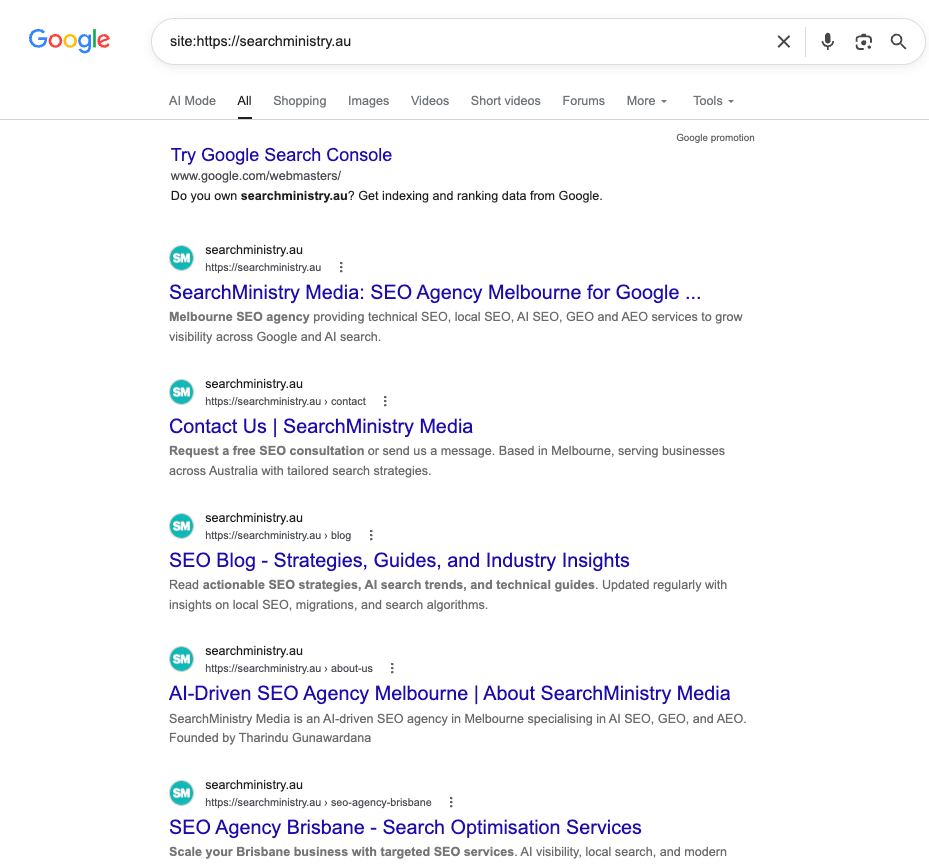
To check for indexability, you can use the "site:" operator in Google. For example, if you type site:example.com into Google, you will see a list of all the pages from example.com that are indexed by Google. If there are no results, then your website is not indexable.
If your website is indexed, you can see how many pages Google indexed as well.
Google Search Console (GSC)
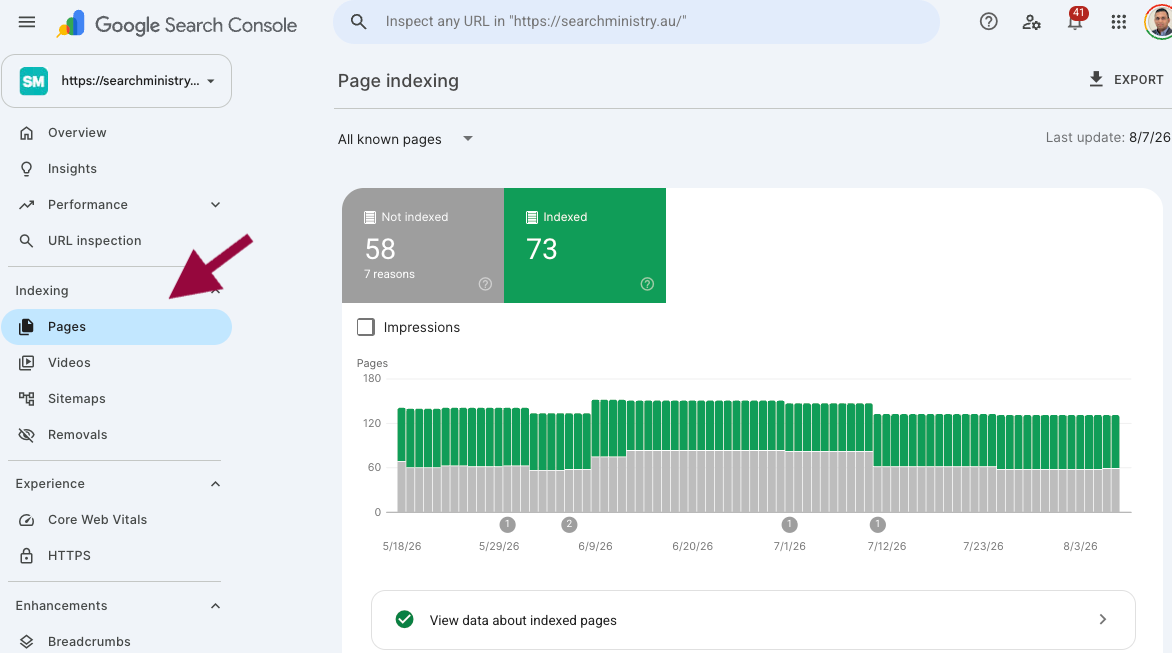
You can also go for a more in-depth analysis of crawlability & indexability using Google Search Console. This tool allows you to see how Google crawls and indexes your website. To use the Google Search Console, you must first create a Google account.
Once you have a Google account, you can add your website to the Google Search Console. There are different ways to verify your website in a GSC account. The recommended method is to verify your domain via DNS records.
After adding your website, under Indexing > Coverage you will be able to see how many pages Google indexed and how many pages Google excluded. By going into each section you can further find details of any issues.
Use a Website Crawler Such as Screaming Frog
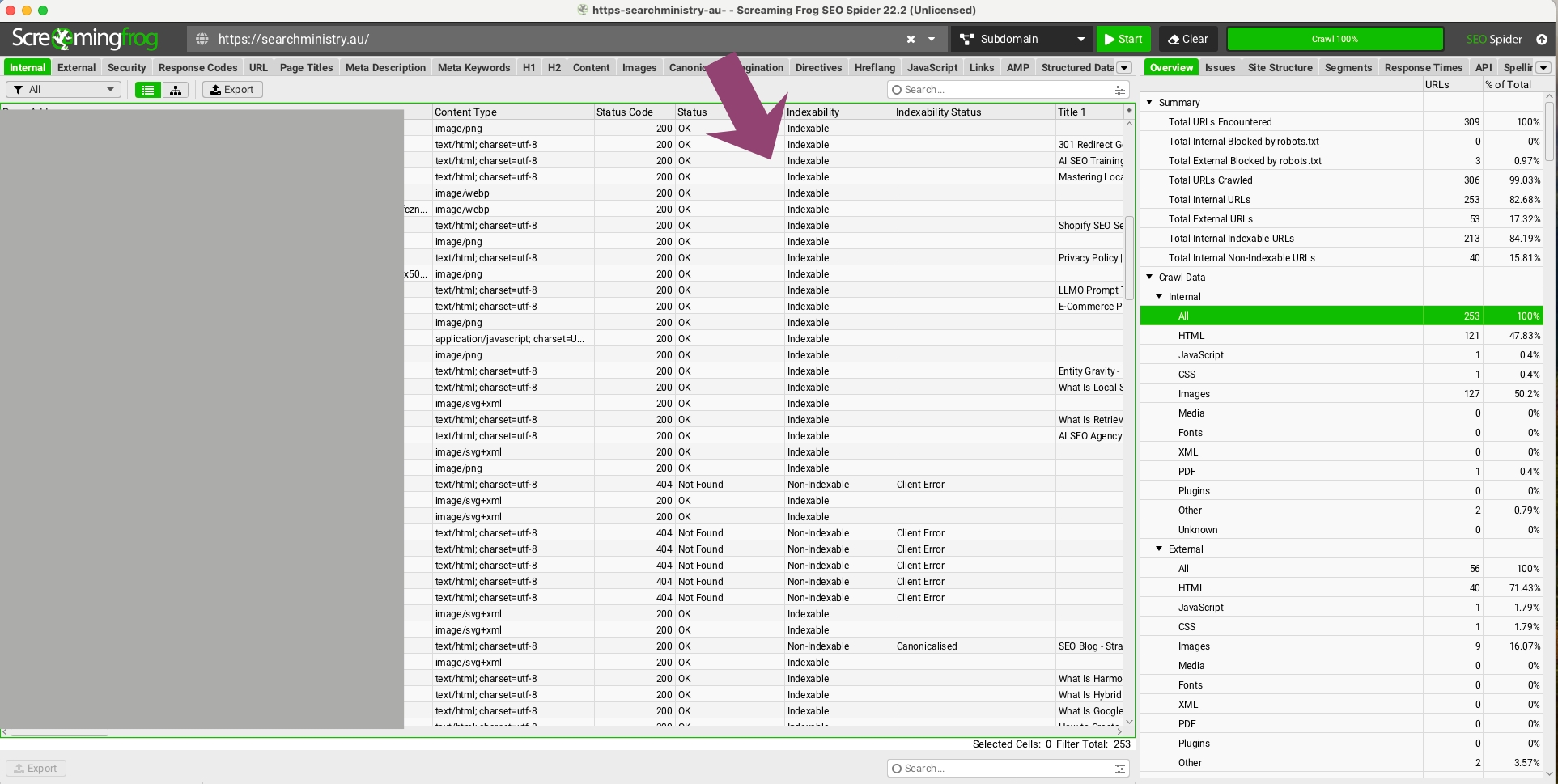
To use Screaming Frog, you first need to download the software. After downloading and installing the software, open it and click "Crawl > Start Crawl." Enter your website's URL and click "Start."
Screaming Frog will then crawl your website and give you a report of any errors it found. The main section you need to look for is "Indexability". You can use this software for many other in-depth technical investigations.
Why Google Cannot Find Your Website: Common Crawling and Indexing Failures
A page absent from Google search results is either not crawled, not indexed, or excluded by a directive. The three most common causes are noindex tags applied to live pages, robots.txt rules that block Googlebot, and insufficient crawl time for new or low-authority pages.
How noIndex Tags Exclude Pages From Google's Search Index
A noindex meta tag instructs Googlebot to crawl the page but exclude it from the search index. Google respects this directive within 24 to 48 hours of the next crawl, making it one of the fastest ways to accidentally de-rank existing content. Check every page template, plugin setting, and staging environment configuration that might inject a noindex tag across your entire site.
Inspect any page for a noindex tag by viewing its source code. Navigate to the page and press CTRL+U on Windows or Option+Command+U on Mac. Search for "noindex" in the source to confirm whether the directive is present.
<head>
  <meta name="robots" content="noindex, nofollow" />
</head>
On the other hand, if you want to know how to block Google with tags, please check here.
Having a Robots.txt File That Blocks Google's Spiders
As we explained before, before Google indexes your website, Google needs to crawl (scan) your website. If Google is not allowed to do this, Google will not crawl the website, which means no indexing.
What is a robots.txt file? "A robots.txt file tells search engine crawlers which URLs the crawler can access on your site." Source: Google
You can view your website's robots.txt file by navigating to:
https://yourdomain.com/robots.txt
User-agent: *
Allow: /

User-agent: Googlebot
Disallow: /private/

Sitemap: https://yourdomain.com/sitemap.xml
Make sure you have not disallowed any Google bots or other search engines.
Google Hasn't Crawled Your Website/Web Page Yet
Another simple reason can be if it's a new website or a web page, Google still hasn't crawled your website or web page.
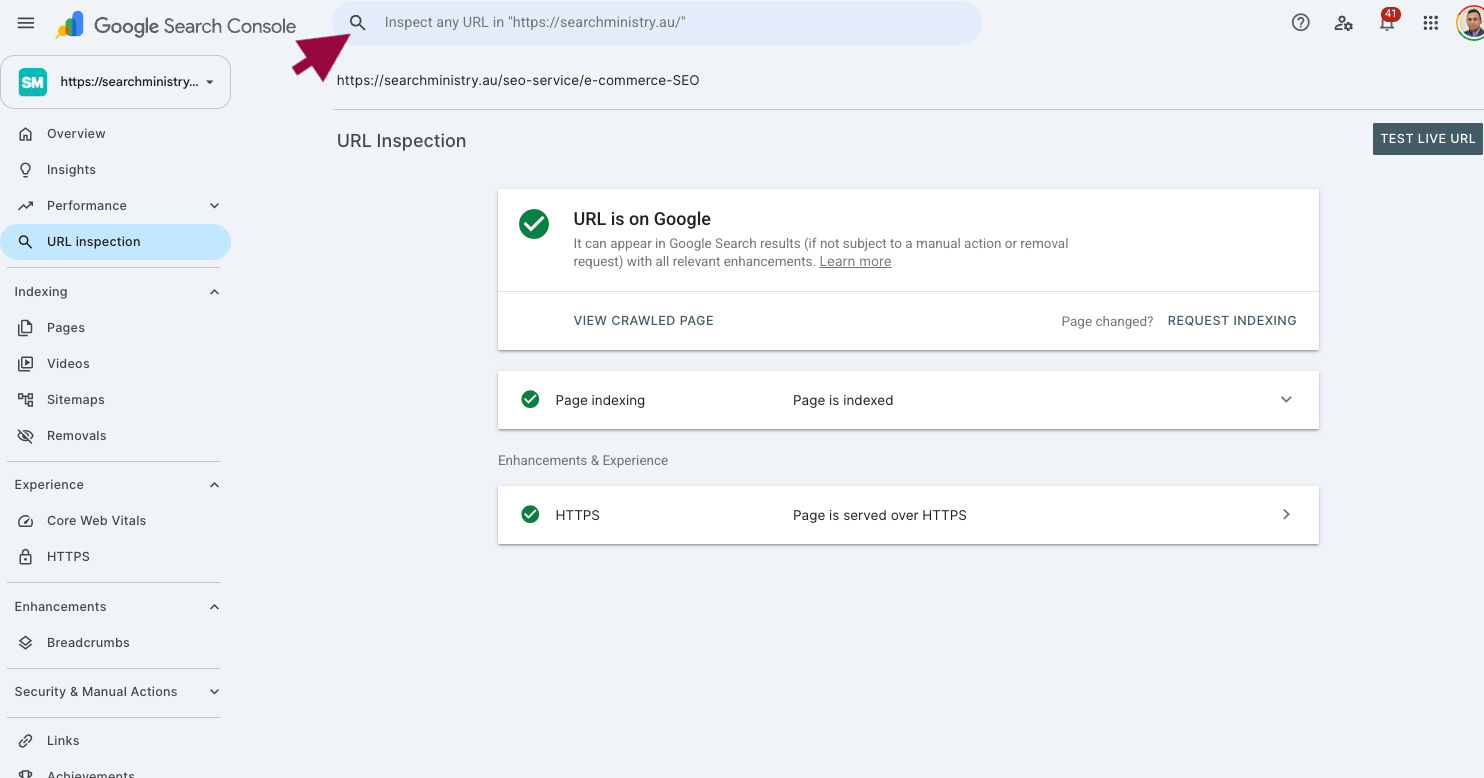
If it's a web page that has been there for a long time and you do not have any of the issues above, this can be due to crawler budget issues or canonical issues on the site. To investigate further, recommend using Google Search Console's live URL testing tool.

Once you enter your URL you will be able to see whether the URL is indexed in Google or not, and what is preventing indexing.
You can simply "Request Indexing" for specific URLs from this URL Inspection tool as well.
How to Increase the Indexability of Your Website
Creating your Google Search Console (GSC) account and submitting your website is the first step in monitoring your website indexing issues and performance in Google.
Apart from the basic issues highlighted above, improving and monitoring the below factors can increase the crawling and indexability of a website.
Simplify Your Website URL Structure
Google has a limited crawler budget for each website. This means Google prioritises the pages they want to crawl and index. If your web page is too deep within the URL, there is less chance that Google will crawl your website.
An example of a too-deep page structure:
example.com/category/subcategory/subcategory/products/productname
As you can see, Google has to complete crawling all four categories before crawling the final product page. Most of the time Google's crawler budget will run out by the time Google reaches the product page, leaving that page not found.
This is important especially if your website is a large website with many different products. To be able to crawl and index efficiently you need to have a flat URL structure.
Examples of flat URL structures:
example.com/products/productname
or
example.com/productname
Improve Internal Links
How do you think Google will prioritise pages to crawl, after crawling the home page?
Internal links are the best signal for Google to know what pages are important on a website. That is why it is important for you to link to primary pages from your home page or footer and always link to internal pages where necessary.
How Broken Links and Redirect Loops Drain Crawl Budget
Broken links direct Googlebot to 404 error pages, consuming crawl budget without indexing any content. A redirect loop sends Googlebot into an infinite cycle between two or more URLs, exhausting the crawl allocation for that session without a single page being indexed. Fix 404s with 301 redirects to the correct destination or by removing the broken link. Resolve redirect loops by mapping your redirect chains and eliminating any circular references. Learn more about how Google allocates crawl budget across your site.
Monitor Server Errors
Server errors block Googlebot from fetching pages, which reduces crawl frequency over time. A 5xx server error signals to Googlebot that the site is unreliable, causing Google to lower its crawl rate. A common trigger is exceeding monthly bandwidth quotas, which returns a 509 error. Monitor your server response codes in Google Search Console under Indexing > Crawl Stats, and refer to the full HTTP status code reference for diagnosis.
How JavaScript, Ajax, and Iframes Block Googlebot
Googlebot processes JavaScript in a separate rendering queue that runs after the initial crawl. Content loaded via JavaScript, Ajax, or iframes is not guaranteed to be indexed with the same page, and in some cases is never indexed at all. Critical content — including navigation links, body text, and internal links — should be present in the server-rendered HTML, not injected exclusively via JavaScript.
Flash-based navigation and content gated behind login forms are not accessible to Googlebot. Heavy, unminified code also extends page load time, which reduces the number of pages Googlebot fetches per crawl session.
Submit a Sitemap
Sitemaps can be HTML or XML sitemaps. The easiest way to submit your sitemap is in the GSC account and it will be easy for Google to find your web pages.
How Duplicate Content Reduces Crawl Frequency
Duplicate content forces Googlebot to spend crawl budget evaluating near-identical pages to determine which version to index, reducing the frequency at which it returns to your site. Use canonical tags to identify the primary version of any duplicated or paginated URL. Regularly publishing original content signals to Googlebot that the site is actively maintained, which increases crawl demand and crawl rate over time. International sites using URL parameters for locale targeting are especially prone to duplicate indexation problems. See our guide to international SEO domain strategy for the correct URL architecture to prevent this.
Improve Your Website Loading Speed
Improving website loading speed means that Google can quickly crawl your website. If a section or code of a website takes time to load, that can lead to crawler budget waste.
Google's search engine results pages (SERPs) may seem like magic, but when you look more closely, you see that sites show up in the search results because of crawling and indexing.
As SEO professionals, our job is to help Google do its job easily. As noted here, rankings come second. You need to index your website in search engines first.
For more information visit How Google Search Organises Information.

Tharindu Gunawardana
Founder & Director, SearchMinistry Media
Tharindu Gunawardana is the Founder of SearchMinistry Media and a search strategist with 17 years of experience across Sri Lanka, Singapore, and Australia. A former Agency SEO Director, he specialises in helping brands transition from traditional SEO to AI-driven discovery. He is the creator of proprietary tools including Brandonomy.ai and SEOMigrator.io, focused on measuring and improving brand visibility within generative AI systems.