When did you last update your website, rebrand, or plan a platform change?
Website changes can be daunting, especially when keeping all your hard-earned SEO intact. This is where content migration comes in, an often overlooked but essential part of the process.
Too often, the focus is on technical migration or URL redirects, while content migration gets ignored because it's seen as less critical. Many assume that updating the technical aspects is enough to succeed, but failing to properly migrate content can lead to a significant loss in SEO value, impacting rankings and user experience.
Let's explore why content migration is critical for your website's success and how you can do it right.
What is Content Migration?
Imagine moving to a new office and leaving behind important files or scattering documents without organization. Now, picture doing this with your website content. That's the risk many people take when they overlook content migration.
There can be significant gaps between the old website and the new one. Generally, when you design a new website, the old content may not be reflected on the new site. The headings, text, and images might differ in the latest version.
Google may have ranked you for the content you already had, but if these content gaps exist, your rankings won't last, as Google will reevaluate your content again. This is why content gap analysis is so critical in SEO migration.
Content migration is the process of transferring all existing website content, including articles, blogs, images, and metadata, to a new platform, design, or structure. It's a pivotal part of broader SEO migration services.
Below are the steps you need to follow for proper content migration.
Step 1: Identify Top Performing Pages
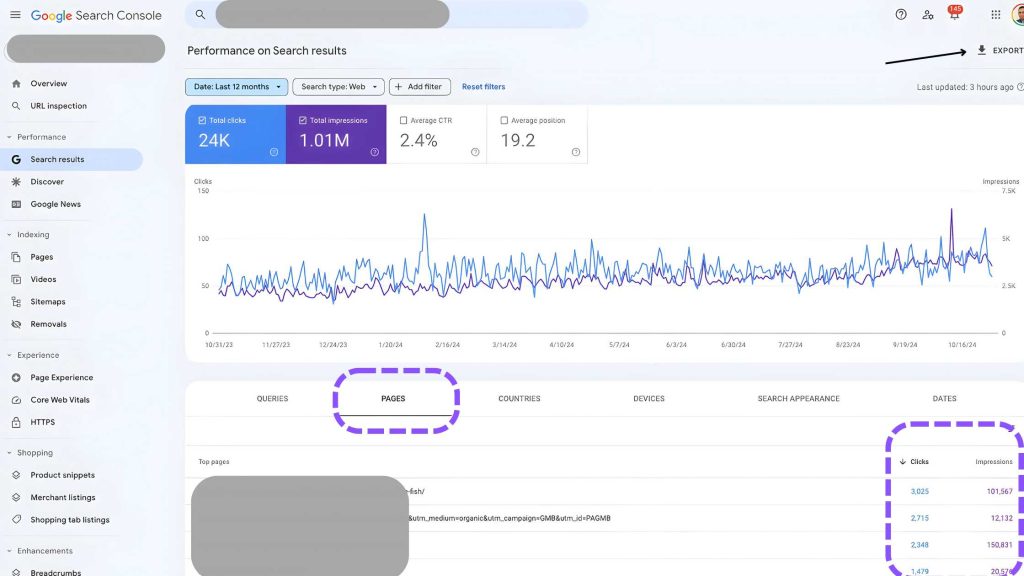
The first essential step is to identify the top-performing pages on your website. This can be done using your Google Search Console account to understand which pages drive the most traffic and hold valuable SEO equity.
Step 2: Content Auditing
Once you know your top-performing pages, conduct a content audit. Essentially, it's about taking stock of all your existing content and understanding what's worth keeping, updating, or removing.
It's a quality control process, ensuring that your site isn't filled with outdated, irrelevant, or duplicated content. The result? You end up with a clear understanding of what's valuable, setting you up for a smoother migration.
Step 3: Page URL Mapping

Now that you know what content to keep, it's time for URL mapping. This means aligning your current content with your new site's structure and mapping the old URLs to the new URLs. This is crucial for avoiding broken links and maintaining consistency.
During this step, look for content gaps:
- URL Optimization: Is the URL the same, or can it be optimized for better readability and SEO? Consider shortening, including keywords, or making it more user-friendly.
- Metadata Updates: Does the metadata (title tags, meta descriptions) need updating to reflect the new content? Ensure the keywords are still relevant and accurately describe the page content.
- Headings and Content Review: Are the headings (H1, H2, etc.) and body text properly aligned with the new structure? Make sure the content is updated, relevant, and structured logically.
- Images and Alt Text: Are images still relevant, and do they have appropriate alt text? Update or replace images if necessary and ensure alt text includes targeted keywords for better SEO.
- Internal Links and FAQs: Are internal links still working and relevant to the new structure? Update links where needed to maintain the flow of information. Review FAQ sections to ensure they address user intent effectively.
- Content Gaps: Are there gaps between the old and new web pages? Make sure that all valuable content is retained or improved upon, and any missing elements are addressed to avoid losing SEO value.
You need to do this for every critical web page that drives most of the traffic. For pages with less traffic or no traffic, URL redirection may be enough. However, for the highest-traffic pages, it's essential to ensure you have covered any content gaps or improved upon the old version.
Organising content this way helps your users and, ultimately, preserves that precious SEO value.
Step 4: Metadata Transfer
Title tags, meta descriptions, image alt text, headers. These all need to be accurately transferred to the new site to retain SEO rankings. It's easy to overlook this, but failing to migrate your metadata properly can have a huge impact on your search visibility.
Make sure the keywords you worked hard to identify are still aligned with your new pages, ensuring that nothing slips through the cracks.
Step 5: Keyword Optimisation
As you migrate content, it's an excellent opportunity to revisit your keywords. Is your content still answering the right questions? Are there new keywords worth targeting?
This is the moment to update headers, subheaders, and body text to align with relevant search queries. Proper keyword optimisation keeps your content fresh and relevant, ultimately supporting better rankings. It's all about ensuring your new site speaks your audience's language.
Step 6: Checking for Duplicate Content
For example, having multiple versions of the same product page with only slight variations in the URL or content can cause confusion for search engines, resulting in reduced rankings.
Where necessary, implement canonical tags to avoid confusion for search engines and keep your SEO game strong.
Wrapping Up
Content migration isn't just an optional step in the SEO Migration process. By identifying top-performing pages, auditing content, mapping URLs, transferring metadata, optimising keywords, and checking for duplicates, you set yourself up for a smooth transition, retaining search rankings and user experience.
Are you planning a site migration? Don't leave your content behind. Follow these steps to make sure your transition is seamless.
Need help with your migration? At SearchMinistry, we are ready to guide you through every step. Contact us for SEO Migration service requests.
Related: SEO Website Migration Checklist

Tharindu Gunawardana
Founder & Director, SearchMinistry Media
Tharindu Gunawardana is the Founder of SearchMinistry Media and a search strategist with 17 years of experience across Sri Lanka, Singapore, and Australia. A former Agency SEO Director, he specialises in helping brands transition from traditional SEO to AI-driven discovery. He is the creator of proprietary tools including Brandonomy.ai and SEOMigrator.io, focused on measuring and improving brand visibility within generative AI systems.