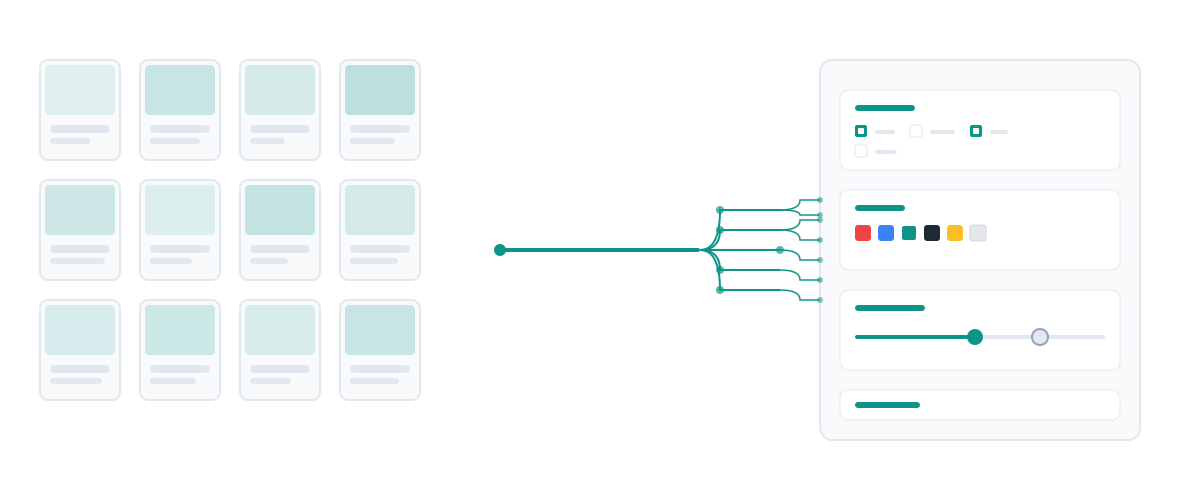
What Is Faceted Navigation?
Faceted navigation is the filtering system on e-commerce category pages that lets shoppers narrow a product listing by multiple attributes simultaneously. A running shoes category might offer filters for size, colour, price range, brand, and gender. Each combination a shopper selects produces a filtered view of the same underlying products.
From a user experience standpoint, faceted navigation is essential. Shoppers expect to filter. The problem is what happens at the URL level. Most e-commerce platforms generate a distinct URL for every filter combination. Three filters with three values each produces 27 URLs. Add a fourth filter and you have 81. Across thousands of categories on a large store, this arithmetic produces millions of near-identical pages that share the same products, descriptions, and headings, but differ only in which subset of products is displayed.
Google treats each of these URLs as a separate page to potentially crawl and index. This creates three interrelated problems: crawl budget waste, duplicate content dilution, and index bloat. Fixing faceted navigation is typically the highest-impact technical SEO task available to large e-commerce sites.
The URL Explosion Problem
The scale of URL explosion is often underestimated until you run a full crawl. A store with 200 category pages, each with five filter types and four values per filter, theoretically generates 200 × 45 = 204,800 URLs. In practice not every combination is navigated, but Google's crawlers discover them through internal links generated by filter menus, and they follow them.
Each of those 27 URLs from the diagram above shows the same product template with slightly different product subsets. The page title, meta description, H1, and category description are typically identical or differ by only the filter values appended to them. Google's systems identify this as low-quality, thin content at scale, and the ranking authority that should concentrate on your root category page fragments across dozens of near-duplicate versions.
There is also an index bloat effect. When Google indexes thousands of thin filter pages, it has to store, rank, and serve them. Sites with severe index bloat often see their strongest pages crawled less frequently, because Googlebot allocates crawl capacity across all discovered URLs, not just the ones you want it to prioritise.
Three Strategies for Managing Faceted URLs
There is no single correct approach to faceted navigation. The right strategy depends on whether a filtered URL has genuine search demand in its own right. The three tools available are canonical tags, noindex meta tags, and URL parameter blocking.
When to use rel=canonical
Use canonical when a filtered page targets a real keyword. "Women's blue running shoes" and "men's trail running shoes under $100" are queries real users search for. If your platform generates distinct URLs for these combinations, pointing them to the root category URL with a canonical tag tells Google that the root is the preferred version, while still allowing Google to discover and understand the filtered content.
Be aware that Google treats canonical tags as a strong hint, not a directive. If the filtered page has significantly different content or links pointing to it, Google may still index it as a separate page. Canonical tags work best when content overlap is very high.
When to use noindex
Use noindex on filter combinations with no search demand: arbitrary combinations of three or four attributes that nobody searches for directly. A noindexed page is still crawlable, which means crawl budget is still consumed. Noindex tells Google not to include the page in search results, but it does not stop Googlebot from visiting the URL. If crawl efficiency is your primary concern, parameter blocking is a stronger option.
When to block URL parameters
For sorting and display parameters (sort=price-asc, view=grid, page=3) that have zero SEO value, blocking discovery via robots.txt or configuring them in Google Search Console's URL Parameters tool prevents Googlebot from crawling them at all. This preserves crawl budget for your canonical category and product pages. Never block filter parameters that correspond to keywords you want to rank for.
JavaScript Filters vs. URL-Based Filters
Some e-commerce platforms implement filtering entirely in JavaScript without changing the URL. When a shopper selects "size: medium", the page re-renders in the browser but the URL remains unchanged. From Googlebot's perspective, there is only one version of the page: the unfiltered one it received on first load.
JavaScript-only filtering avoids the URL explosion problem but creates a different issue: Google cannot discover or rank the filtered views. If "blue trail running shoes" has genuine search volume, a JS-only filter means you have no indexable page targeting that query. URL-based filtering with proper canonical or noindex treatment gives you the option to capture long-tail category traffic that JavaScript filtering forecloses entirely.
Platform-Specific Considerations
Shopify generates URL parameters by default for filter selections (e.g. ?filter.p.m.colour=Blue). The platform does not apply canonical tags to these URLs automatically. Custom theme development or third-party apps are required to add canonical tags or noindex tags to filtered pages. Shopify's built-in sitemap excludes filter URLs, which helps, but does not stop Googlebot from discovering them through crawl.
WooCommerce uses URL-based filtering through the WooCommerce Layered Nav widget. By default it generates parameters like ?pa_colour=blue. The Yoast SEO plugin provides controls for indexing behaviour per parameter type, making WooCommerce one of the more manageable platforms for faceted SEO at scale.
Magento / Adobe Commerce is the platform most associated with severe faceted navigation problems. Its layered navigation generates large volumes of indexed filter URLs out of the box. Magento has URL parameter configuration in the admin panel, but large enterprises often deploy custom solutions or crawler-level controls through CDN configurations.
How Faceted Navigation Affects Crawl and Indexation
Faceted navigation is one of the few technical SEO issues where the wrong configuration actively works against you at scale. Every thin, uncontrolled filter URL consumes crawl budget that should go to your product detail pages, steals ranking signals from your root category URLs, and adds to index bloat that can suppress your site's overall crawl frequency.
The audit process starts with a full crawl to count how many URLs exist on the site versus how many pages you actually want Google to index. For most e-commerce stores, the ratio is alarming: a store with 5,000 products might have 500,000 discoverable URLs once filters are included. Bringing that ratio back toward 1:1 through canonical tags and parameter blocking is typically one of the highest-return technical SEO investments available.
For AI search engines, uncontrolled faceted URLs create a signal dilution problem. When AI systems retrieve content to generate answers about product categories, they assess page authority and content quality. A site with hundreds of thin, near-identical category page variants signals low content investment, reducing the probability those category pages are cited in AI Overviews or generative answers.
Use the Category Page SEO Checker to audit your category pages for thin content signals, missing canonical configurations, and structural issues that affect both traditional rankings and AI citability. For a full technical audit including crawl budget analysis, the SEO Audit service maps the complete URL graph of your site.
Frequently Asked Questions
Does faceted navigation always hurt SEO?
Not always. Faceted navigation hurts SEO when filter combinations are indexed without control, creating duplicate content and crawl budget waste. When managed correctly with canonical tags, noindex directives, and parameter blocking, faceted navigation can actually help by allowing targeted filter URLs to rank for long-tail queries while protecting root category authority.
Should I use canonical tags or noindex on filter pages?
Use canonical tags on filtered pages that target keywords with real search volume (e.g. "blue trail running shoes"). Use noindex on filtered pages with no distinct search demand. Use parameter blocking via robots.txt or Search Console for sorting, pagination, and display parameters that have zero SEO value.
How do I know which filter combinations are worth indexing?
Research search volume for filter attribute combinations. Use Google Search Console to check if any filtered URLs are already receiving impressions, which indicates search demand. Tools like Google Keyword Planner can confirm whether queries like "running shoes colour size brand" have measurable volume before you decide to index those combinations.
Does Shopify handle faceted navigation SEO automatically?
No. Shopify's default filtering generates URL parameters without automatically applying canonical tags or noindex directives to filter combinations. Shopify excludes filter URLs from its generated sitemap, which helps prevent explicit sitemap submission of thin pages, but Googlebot can still discover and crawl filter URLs through the filter menus on category pages. Custom theme modifications or specialist apps are required to add proper canonical or noindex handling.
How many URLs is too many for a filter page to be worth indexing?
There is no fixed number. The question is whether the filtered view targets a query with search volume and whether the page offers enough unique content to justify a separate index entry. A filtered page showing 3 products with no unique description, no editorial content, and identical title and meta description to the root category is not worth indexing regardless of its URL count.
What is the difference between faceted navigation and pagination?
Faceted navigation filters products by attribute (size, colour, price). Pagination divides a long product list into sequential pages (page 1, page 2). Both create URL variants that require management, but the approaches differ. Paginated pages should generally be allowed to be crawled (they help Googlebot discover all products) but not necessarily indexed beyond page 1. Filter pages require case-by-case judgement based on search demand.
Need a Faceted Navigation Audit?
Uncontrolled filter URLs are one of the most common causes of ranking stagnation on large e-commerce sites. A technical audit maps every URL on your site, identifies duplicate content clusters, and builds a filter control strategy aligned to your actual search demand.

Tharindu Gunawardana
Founder and Director of SearchMinistry
Tharindu Gunawardana is the Founder of SearchMinistry Media and a search strategist with 17 years of experience across Sri Lanka, Singapore, and Australia. A former Agency SEO Director, he specialises in helping brands transition from traditional SEO to AI-driven discovery.