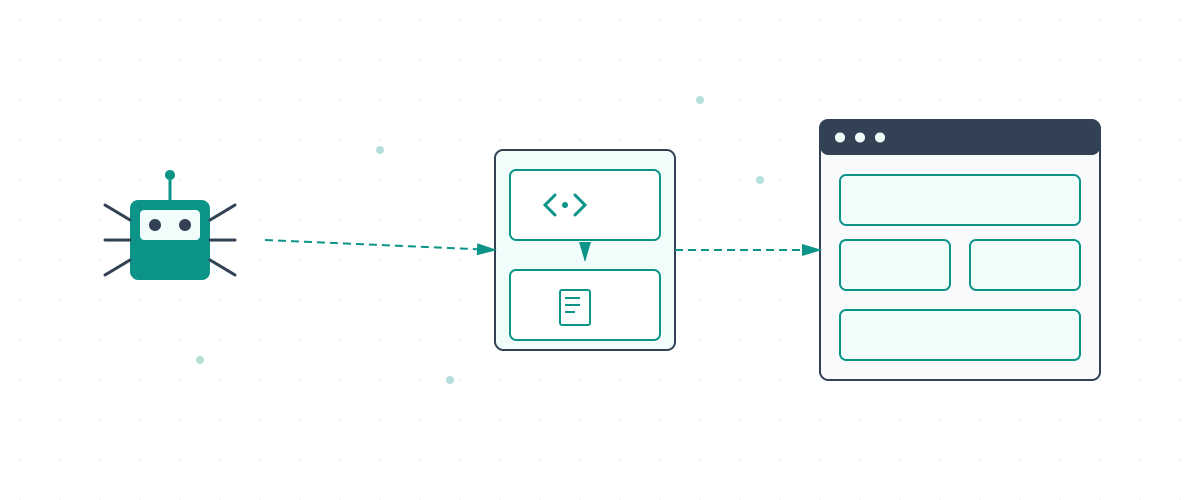
Vibe coding has made it faster than ever to ship a working website. A well-structured brief, a capable AI coding tool, and you have a deployed React or Next.js app within hours. The problem is that the same JavaScript-heavy architecture that enables rapid development creates a specific class of SEO problems that most vibe-coded websites never solve. Search engines cannot run JavaScript the way a browser does. When your entire page content lives inside a JavaScript bundle, Googlebot may crawl an empty shell and index nothing.
Written from direct experience
This website (searchministry.au) was built entirely using Replit with vibe coding: React, Express, and Vite, generated and iterated with AI assistance over many sessions. Every rendering problem described in this guide, and every fix listed, was encountered and applied on this live site. We are not describing theory. We are describing what we built.
This guide covers the full technical SEO stack for Vibe platform websites: server-side rendering, meta tag management, URL structure, Core Web Vitals, and structured data. Every section includes implementation code you can adapt directly. If your Vibe site is already built, treat this as an audit checklist. If you are starting fresh, use it as a build specification.
What this guide covers
The #1 Issue: Client-Side Rendering vs Server-Side Rendering
The single most important SEO decision for a Vibe-coded site is whether the server delivers fully rendered HTML or an empty JavaScript shell. Most Vibe-coded sites default to client-side rendering (CSR): the server sends an almost-empty HTML file and JavaScript builds the visible content in the browser. This works for users but creates a serious problem for Googlebot.
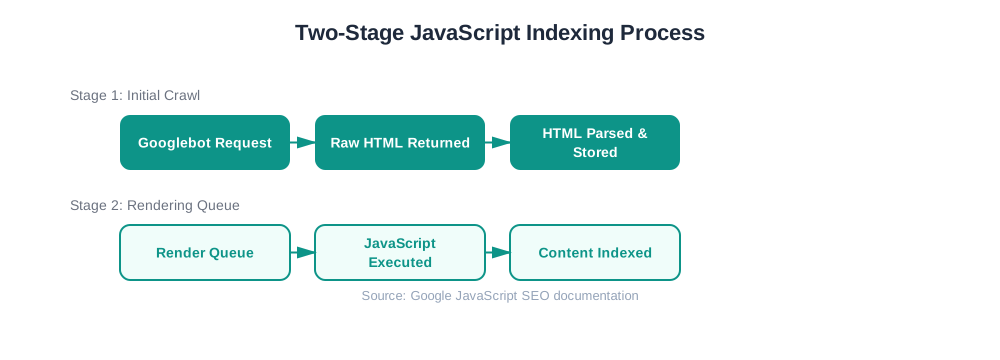
Googlebot does not behave like a user's browser. It fetches your URL, receives whatever HTML the server sends, and records it. If the HTML is an empty shell with a <div id="app"></div>, that is what Google initially indexes. JavaScript execution happens later, in a separate render queue, with delays that can range from hours to weeks. Many pages never get re-crawled after rendering.
<!-- What Googlebot receives immediately -->
<html>
<head>
<title>My App</title>
</head>
<body>
<div id="app">
<!-- empty -->
<!-- JS builds content here -->
</div>
<script src="/bundle.js"/>
</body>
</html>
Result: Empty shell indexed. Content may never rank.
<!-- What Googlebot receives immediately -->
<html>
<head>
<title>SEO Agency</title>
<meta name="description" content="..."/>
<link rel="canonical" href="..."/>
</head>
<body>
<h1>SEO Services</h1>
<p>Full page content here...</p>
</body>
</html>
Result: Full content indexed immediately. No render queue wait.
Why this matters more than anything else
If Googlebot cannot read your content in the initial HTML response, your page ranks on an empty shell. All the keyword research, content writing, and link building in the world will not fix a rendering problem. Solve SSR first, then optimise everything else.
Google's Take on Vibe-Coded Websites
Google treats vibe-coded websites as normal websites that can rank well, but Mueller's guidance comes with two specific warnings: publishing speed without matching traffic signals low quality, and AI-generated content without original insight accumulates a sitewide demotion risk over time.
"These are essentially normal websites, so they can be fine for search."
John Mueller, Google Search Advocate
That is reassuring, but Mueller's statement comes with important context. Vibe coding removes technical barriers, which means it also removes friction that previously limited how fast and how much content teams could publish. That speed introduces risks that Google has specifically updated its systems to address.
Key things to pay attention to:
- 01
Publishing volume without traffic is a red flag
Make sure the content you publish adds genuine value to the web. Vibe coding makes it easy to produce content quickly, but Google monitors publishing frequency closely. The March 2024 core update introduced a specific penalty targeting websites publishing content programmatically at scale. The issue is not how many pages you publish. If those pages do not attract traffic in proportion to your publishing rate, your site will accumulate a pattern Google treats as a signal of low-quality scaled content.
- 02
AI alone produces duplicate content
AI models are trained on existing datasets. When you use AI to generate content without adding original insight, you are adding duplicate information to the web. Google has a separate system that assesses Information Gain, measuring how much new knowledge a piece of content contributes beyond what already exists. Publishing thousands of pages without genuine added value puts your entire domain at risk under the Helpful Content Update. You may see short-term visibility gains, but the risk compounds over time and can result in a sitewide demotion.
Why Vibe-Coded Sites Create a Two-Stage Indexing Problem
JavaScript-heavy Vibe builds create a two-stage indexing problem. On first crawl, Googlebot records the raw HTML shell and queues the page for JavaScript rendering. That render queue delay can stretch from hours to weeks, and pages may be indexed with incomplete or missing content while they wait.
According to Google's JavaScript SEO documentation, search engines must execute JavaScript before understanding page content. Vibe websites that do not account for this process experience indexing delays, incomplete content discovery, and ranking gaps on pages that look perfectly functional in a browser. The content exists. Googlebot simply cannot see it yet.
Key Takeaway
Vibe platform SEO success depends on proper server-side rendering so critical content is available in the initial HTML response, before JavaScript executes.
Common SEO Challenges with Vibe Websites
The most frequent issues affecting Vibe-coded website SEO stem from improper JavaScript implementation and missing foundational technical elements. Understanding each challenge's impact helps you prioritise the fixes that move rankings fastest.
| Challenge | Impact on SEO | Priority |
|---|---|---|
| Client-side only rendering | Delayed or incomplete indexing: content may never appear in search | Critical |
| Missing meta tag implementation | Poor SERP presentation, duplicate titles, missing descriptions | High |
| Hash-based URL routing (#/products) | Search engines treat everything after # as a fragment, not a URL | High |
| Lack of internal linking structure | Reduced PageRank distribution, orphan pages not discovered | Medium |
| No XML sitemap generation | Discovery issues for deep or dynamically created pages | Medium |
For a diagnostic framework that applies across all JavaScript-rendered sites, the crawlability and indexability issues checklist covers the full range of rendering, redirect, and discovery problems that prevent pages from appearing in search.
Architecture Considerations for SEO
Vibe platform architecture must prioritise SEO from the foundation. The framework's component-based structure requires careful planning to maintain clean URL hierarchies and logical site organisation. Implement a hierarchical URL structure that reflects your content taxonomy. For a services site: /services/, /services/seo-audit/, /services/seo-audit/technical/. Each level reinforces topical authority for the parent.
Ensure your sitemap generation handles trailing-slash and non-trailing-slash variants consistently. Google treats /contact and /contact/ as different URLs. Pick one pattern and use canonical tags to enforce it across every page.
Server-Side Rendering Implementation
Server-side rendering (SSR) solves the two-stage indexing problem by executing JavaScript on the server and returning complete HTML to Googlebot. The crawler receives a fully rendered page and can index content immediately, with no render queue delay.
// Express + Vibe server renderer
const express = require('express');
const { renderToString } = require('@vibe/server-renderer');
const app = express();
app.get('*', (req, res) => {
const html = renderToString({
url: req.url,
context: {}
})
res.send(`
<!DOCTYPE html>
<html>
<head>${getMetaTags(req.url)}</head>
<body>
<div id="app">${html}</div>
<script src="/js/app.js"></script>
</body>
</html>
`)
}
Tip
Test your SSR implementation using Google's URL Inspection Tool in Search Console. Paste the URL and click "Test Live URL" to see exactly what Googlebot receives. If the rendered HTML is missing page content, your SSR is not working correctly.
How We Made This Replit Site Crawlable: 5 Fixes Applied
SearchMinistry Media was built on Replit using AI-assisted vibe coding. The framework is React with Vite on the frontend and Express on the backend, with wouter for routing. Out of the box, that combination is a classic client-side SPA: Googlebot would receive an empty shell. Here is the exact rendering stack we built to fix that, and that is live on this site right now.
Bot-detection middleware
server/seo-middleware.ts
Every incoming request checks the User-Agent header. If the request comes from Googlebot, Bingbot, GPTBot, or any recognised crawler, a flag is set on the request object. This flag switches the response path from the React SPA to the pre-rendered HTML pipeline.
Pre-rendered HTML content per page
server/bot-renderer.ts
A lookup map stores the full semantic HTML for each URL: headings, paragraphs, lists, tables. When a crawler hits any page, the server looks up that URL and returns the stored HTML directly, with no JavaScript execution required. This is what you are reading right now if you are a search engine.
Server-side meta tag injection
server/page-meta.ts
A second lookup map stores the title, meta description, canonical URL, and Open Graph image for every page. These are injected into the HTML head before the response is sent, ensuring every page has unique, correctly set meta tags regardless of whether the requester is a bot or a user.
Dynamic sitemap generation
server/routes.ts
An Express endpoint at /sitemap.xml dynamically generates an XML sitemap listing every public URL on the site with lastmod dates. It is submitted to Google Search Console and keeps itself current as new pages are added.
History-based routing
client/src/App.tsx + Express catch-all
wouter is configured in history mode (not hash mode), so every page has a real, crawlable URL. The Express server has a catch-all route that serves the HTML shell for any path not handled by an API endpoint, then lets wouter take over on the client.
The key insight
You do not need full server-side rendering of the React component tree to solve the indexing problem. Bot detection plus pre-rendered HTML content achieves the same result with far less complexity. Users get the React SPA. Crawlers get clean HTML. Both groups get exactly what they need.
AI Agent Prompts for SSR
If your Vibe-coded site does not yet have server-side rendering or bot-detection, these are the prompts to use. Paste them into Replit's AI agent, Cursor, or any AI coding assistant. Each prompt is scoped to one specific task so the agent has a clear, achievable target.
Add a middleware to my Express server that detects search engine crawlers by checking the User-Agent header for Googlebot, Bingbot, GPTBot, and other common crawlers. For crawler requests, return a pre-rendered HTML response containing the full page content (headings, paragraphs, structured text) for the requested URL path. Store the per-page content in a lookup map keyed by URL path. For regular user requests, continue serving the React app normally. This ensures search engines can index all content without JavaScript execution delays. Implement the middleware in a separate file (server/bot-renderer.ts) and register it before the React catch-all route.
Create a server-side meta tag system for my Express and React app. Build a lookup map (server/page-meta.ts) where each key is a URL path and each value contains: title, metaDescription, canonical URL, and optional og:image URL. In the Express server, intercept all HTML responses and inject the correct meta tags into the HTML head for the requested path before sending. This must work for both crawler requests and regular user requests so every page has a unique title and description in the initial HTML response.
Add a /sitemap.xml endpoint to my Express server that generates a valid XML sitemap. It should list all public pages of my site with their full URLs (using https://yourdomain.com as the base), a lastmod date, changefreq (monthly or weekly), and priority values between 0.5 and 1.0. Include all service pages, blog posts, guide pages, and tool pages. Set the response Content-Type header to application/xml. This sitemap should be accessible at /sitemap.xml and updated automatically when new routes are added to the array.
My React app is currently using hash-based routing (URLs like /#/page). This prevents search engines from indexing individual pages. Switch to history-based routing so every page has a real URL path (like /page). Update the router configuration to use browser history. Add an Express catch-all route at the end of all API routes that serves the index.html file for any path not matched by an API endpoint, so direct URL access and page refreshes work correctly. Do not break any existing API routes during this change.
How to use these prompts effectively
- 1.Run them in order: bot detection first, meta tags second, sitemap third.
- 2.After each prompt, use Google's URL Inspection Tool to verify the change worked before running the next one.
- 3.Replace "yourdomain.com" with your actual domain in the sitemap prompt before using it.
- 4.If the agent cannot find a specific file it needs to edit, tell it the exact file path and ask it to look at the current contents first.
Meta Tag Implementation
Dynamic meta tag generation ensures each page has a unique, optimised title and description. Vibe platforms require programmatic meta tag management since traditional static approaches do not work with component-based architectures. Create a centralised meta tag system that updates on every route change and handles title tags, meta descriptions, canonical URLs, Open Graph tags, and Twitter Card markup.
| Meta Tag Type | Priority | Implementation Notes |
|---|---|---|
| Title tags | Critical | Page-specific, under 60 characters, primary keyword front-loaded |
| Meta descriptions | Critical | Unique per page, 150-155 characters, include a call to action |
| Canonical tags | High | Absolute URLs always; relative canonicals break across environments |
| Open Graph tags | Medium | Required for accurate social previews: og:title, og:image, og:url |
| Schema.org markup | Medium | Content-type specific; see Schema section below |
URL Structure Optimisation
Clean URL structures improve both user experience and search engine understanding. Vibe platforms often default to hash-based routing, which creates a critical SEO problem: search engines treat everything after the # character as a fragment identifier, not a navigable URL. This means every page on a hash-routed Vibe site looks identical to Googlebot.
/#/products/wireless-headphones
/#/products/gaming-keyboard
// Both URLs look like "/" to Googlebot
/products/wireless-headphones
/products/gaming-keyboard
Switching to history-based routing requires your server to handle direct URL access: any path must return the same HTML shell, then let the client-side router take over. Configure your Express or Node server with a catch-all route that serves index.html for all paths, with your SSR layer rendering the correct content for each.
Core Web Vitals for Vibe Platforms
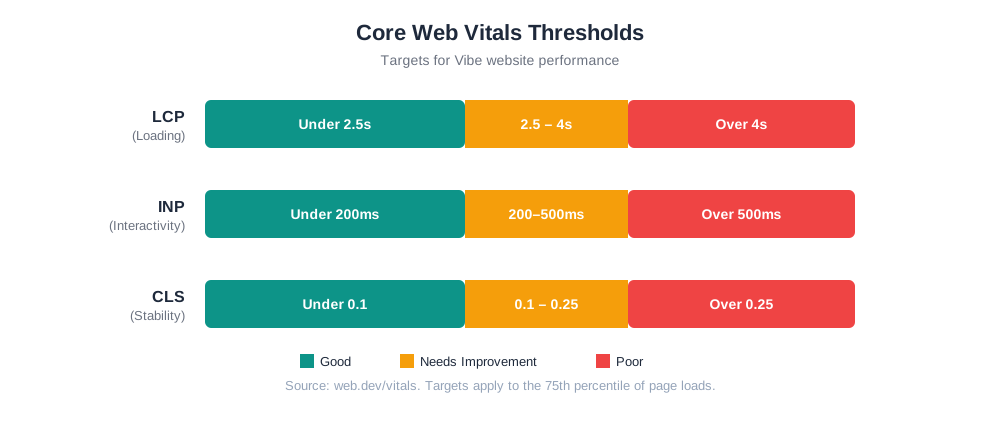
Google's Core Web Vitals are a direct ranking factor. According to Google's web.dev documentation, 75% of page loads must pass Core Web Vitals thresholds to qualify for optimal search performance. Vibe applications frequently struggle with all three metrics due to JavaScript dependency chains, dynamic content loading, and large initial bundle sizes.
LCP Optimisation Strategies
Largest Contentful Paint measures how long it takes for the largest visible element (typically the hero image or main heading) to render. Vibe applications often post poor LCP scores because the hero element is rendered by JavaScript, adding a full JS parse-and-execute cycle before the user sees anything.
Implement resource prioritisation to load above-the-fold content first. Use <link rel="preload"> for hero images and primary fonts. Configure your Vite build to inline critical CSS and defer non-essential JavaScript.
- Image optimisation: Serve WebP or AVIF format with appropriate sizing. Use
srcsetfor responsive images. Addfetchpriority="high"andloading="eager"on the LCP image only. - Font loading: Preload critical fonts with
rel="preload" as="font" crossorigin. Usefont-display: swapin your CSS to prevent invisible text during font loading. - JavaScript splitting: Use Vite's dynamic
import()to load only the JavaScript needed for each route, reducing initial bundle size. Below-the-fold components should be lazy-loaded.
Target
LCP under 2.5 seconds for 75% of page loads, measured on mobile via Chrome User Experience Report (CrUX). Always test from a server location close to your primary audience, as network latency from distant CDN origins can add 150-300ms to your measured LCP, masking real-world performance for your users.
INP Improvement Techniques
Interaction to Next Paint (INP) replaced First Input Delay as a Core Web Vital in March 2024. INP measures the latency of all user interactions, not just the first one. Vibe applications with heavy JavaScript processing post poor INP scores when the main thread is blocked during user interactions.
Break up long-running JavaScript tasks using time slicing: chunk processing into units under 50ms and yield control back to the browser between each. For computationally intensive operations like data filtering or chart rendering, use Web Workers to run the processing off the main thread. This is particularly effective for Vibe dashboards and e-commerce filtering interfaces.
Warning
Third-party scripts (chat widgets, analytics, tag managers) are the leading cause of INP failures on Vibe sites. Load them after the main thread is idle using requestIdleCallback or defer them behind a user interaction event.
CLS Reduction Methods
Cumulative Layout Shift measures visual stability. Dynamic content loading in Vibe applications causes unexpected layout shifts when elements render and push existing content down. Two patterns cause the majority of CLS failures on Vibe sites.
First: images without explicit width and height attributes. When an image loads, the browser does not know how tall it will be, so it renders at 0px then jumps to full size, shifting everything below it. Set width and height attributes on every image, or use aspect-ratio CSS to reserve the correct space before the image loads.
Second: content that loads asynchronously and appears above existing content. If your Vibe app fetches a promotional banner or notification bar from an API, reserve the exact pixel height for that element before the API call resolves. Use CSS skeleton loaders with fixed heights to hold layout position while data loads.
Schema Markup Implementation
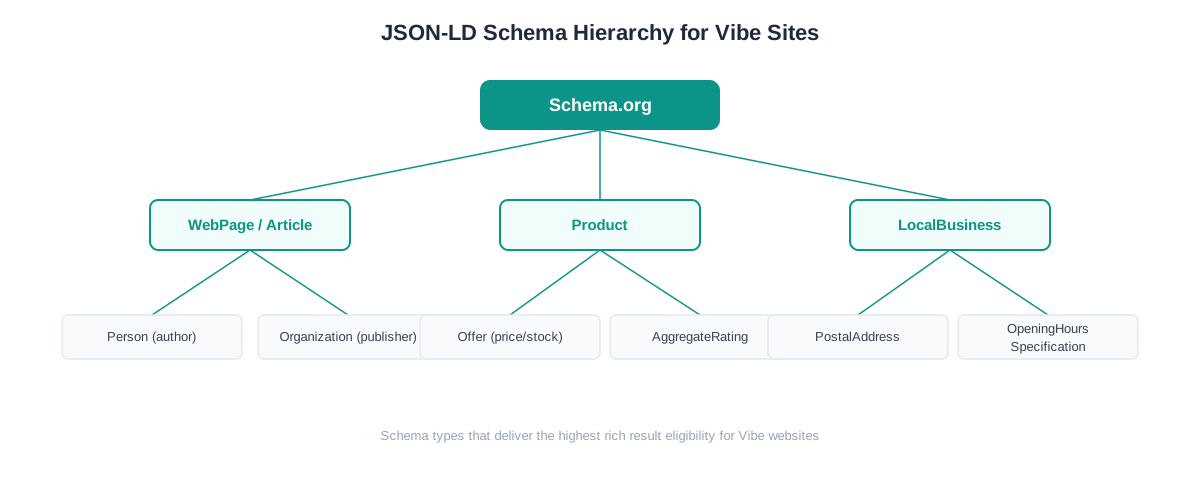
Structured data helps search engines understand your content type and enables rich results in Google Search. For Vibe sites, schema markup requires a programmatic approach: you cannot hard-code JSON-LD when your content is dynamic.
JSON-LD Implementation in Vibe
JSON-LD format works best for Vibe applications because it separates structured data from HTML content. This allows dynamic schema generation without interfering with component rendering. Create reusable schema components that generate appropriate markup based on page content and data layer values.
// React hook for injecting JSON-LD schema
function useProductSchema(product) {
useEffect(() => {
const schema = {
'@context': 'https://schema.org/',
'@type': 'Product',
name: product.name,
description: product.description,
offers: {
'@type': 'Offer',
price: product.price,
priceCurrency: 'USD', // use your local currency code
availability: product.inStock ? 'InStock' : 'OutOfStock'
}
}
// inject script, remove on unmount
}, [product.id])
}
Dynamic Schema Generation
Dynamic schema generation ensures structured data stays current with your content. Build schema generation logic that adapts to different content types and includes all relevant properties. Implement conditional schema properties: include aggregateRating only when reviews exist, add brand when a brand is specified. Omitting optional properties when data is unavailable prevents schema validation errors.
| Content Type | Schema Type | Required Properties |
|---|---|---|
| Product pages | Product + Offer | name, price + priceCurrency, availability, description, image |
| Service pages | Service + Organization | serviceType, provider, areaServed, name |
| Blog articles | BlogPosting + Person | headline, author, datePublished, image, description |
| Local business | LocalBusiness | name, address (PostalAddress), telephone, openingHours |
Validation and Testing
Regular schema validation prevents errors that could disqualify pages from rich result eligibility. Use Google's Rich Results Test and Schema Markup Validator at every stage of development, not just at launch. Schema errors introduced by a content update can silently remove rich results from pages that previously qualified.
Set up automated schema validation as part of your CI/CD pipeline. Always include the priceCurrency property using the correct ISO 4217 code for your market (USD, GBP, EUR, CAD, and so on). Omitting it, or using the wrong currency code, will cause price rich results to display incorrectly in search results for your region.
Monitor rich result performance in Google Search Console under the "Search Appearance" section. Track impressions and clicks separately for each rich result type (Product, Article, FAQ) to measure the SEO impact of your schema implementation and identify which types are delivering ranking value.
How to Check Whether Google Can Render Your Page
After implementing SSR, you need to confirm it is actually working from Google's perspective. The URL Inspection Tool in Google Search Console shows you exactly what Googlebot fetches and renders for any URL on your site. This is the most direct way to verify your Vibe site is indexed correctly.
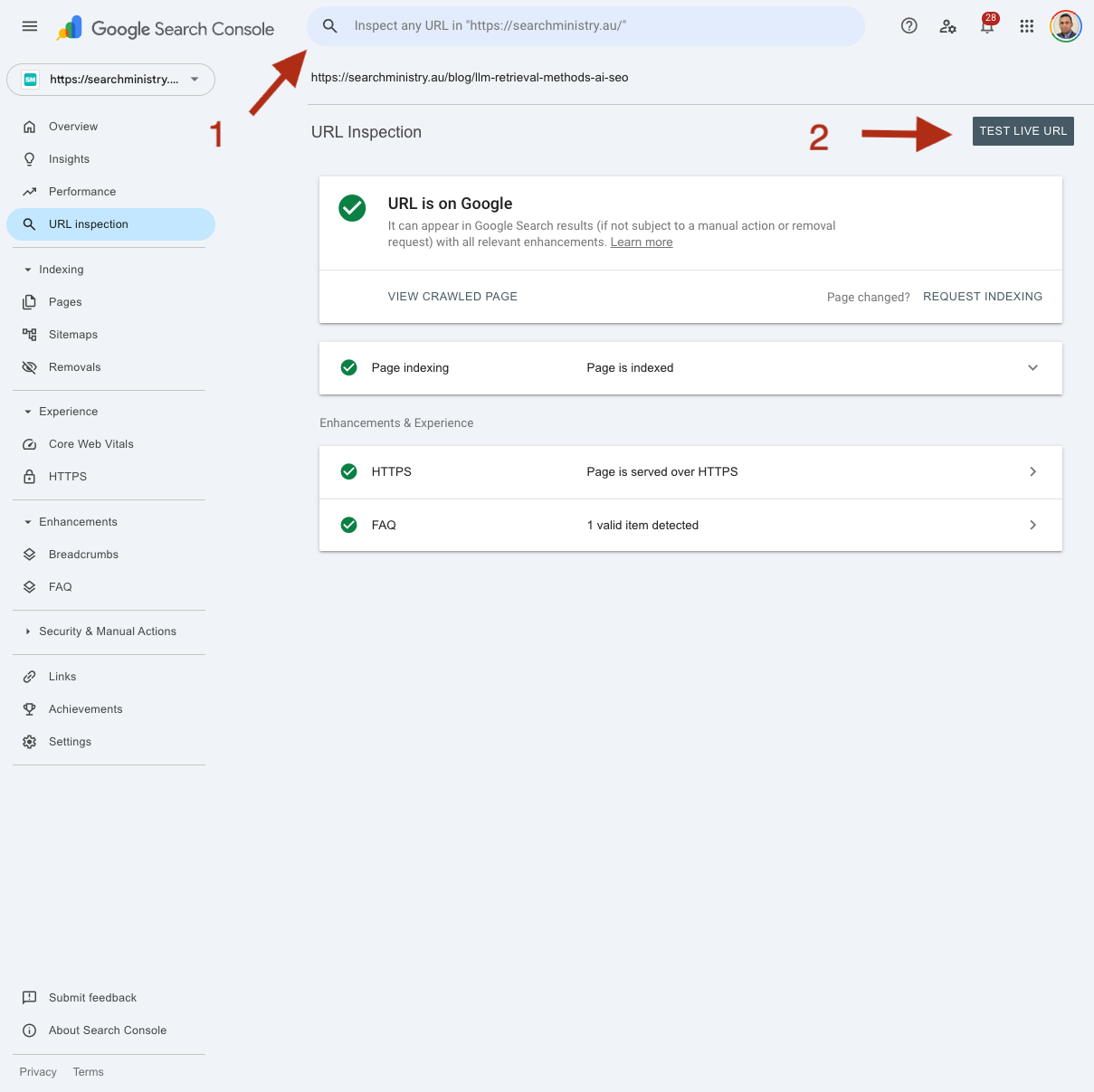
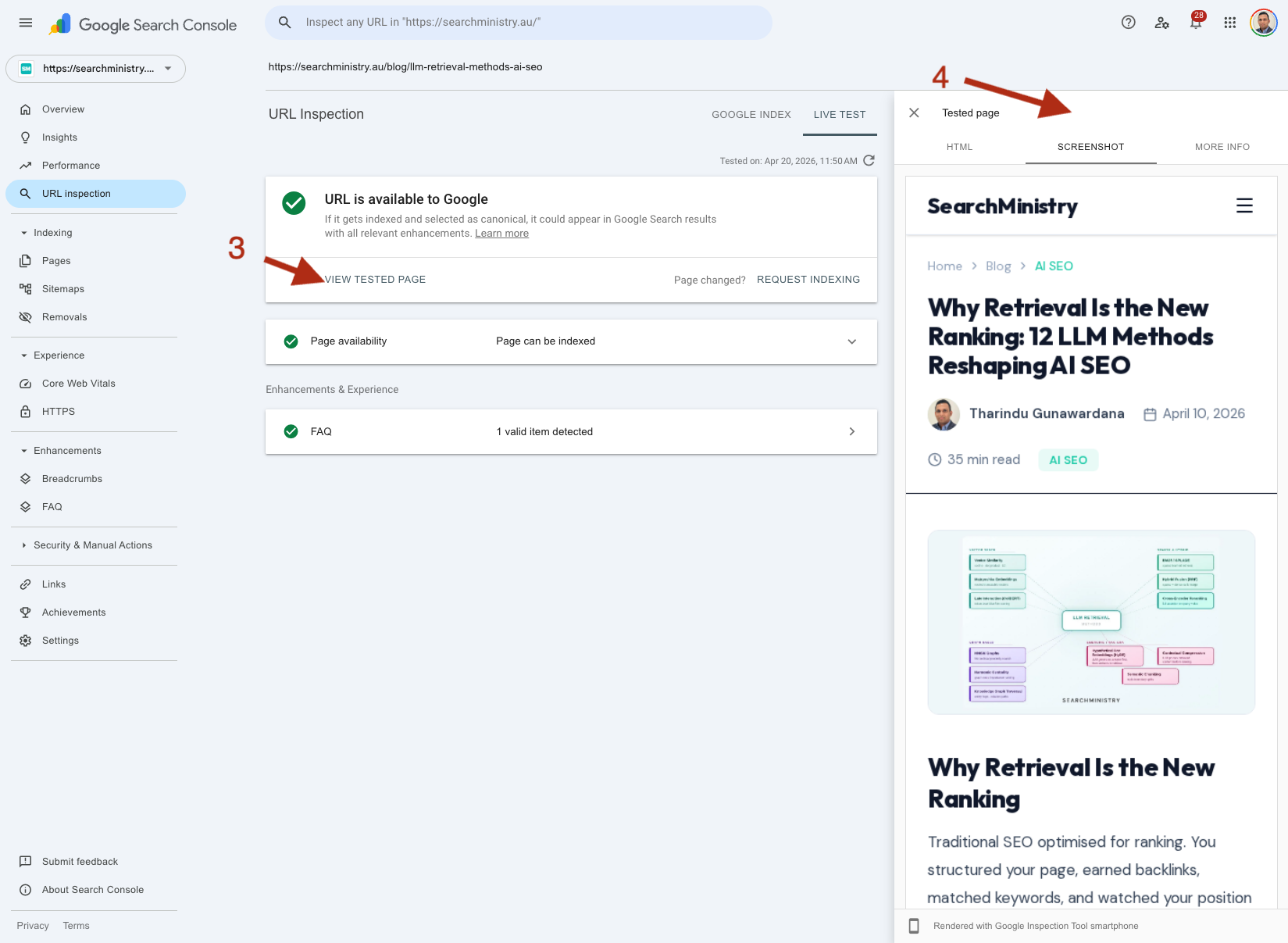
What to look for
- Screenshot tab: If the rendered screenshot matches what a real user sees in a browser, your SSR is working. If the page looks blank or broken, Googlebot cannot render it.
- HTML tab: Copy the full source and save it as an HTML file, then open it in a browser. Check that your actual content (headings, paragraphs, product names) appears in the source. If you only see
<div id="app"></div>with no content, SSR is not working.
Vibe SEO Launch Checklist
Before launching a Vibe-coded website, or before requesting a technical SEO audit, verify each of these items. Missing any one of them can undermine the entire site's indexability.
Confirm SSR is returning full HTML
Use curl or the URL Inspection Tool to fetch a page. The response body must contain your visible page content: headings, paragraphs, product names, not just <div id="app"></div>.
Switch hash routing to history routing
Every page must have a distinct, crawlable URL. Verify in your router config that history mode (or BrowserRouter in React) is active, and that your server handles all paths with a catch-all.
Set explicit width and height on all images
Open DevTools, filter Network by 'Img', and check every image element for width and height attributes. Missing attributes cause CLS failures that directly affect ranking.
Implement per-route title and meta description
Navigate through 5 different pages and check the browser tab title. If every page shows the same title, your meta tag system is not route-aware.
Add absolute canonical URLs on every page
Canonicals must use the full URL (https://yourdomain.com/path), not a relative path. Test with a canonical tag checker or view page source.
Generate and submit a sitemap
Your sitemap should list every indexable URL with lastmod dates. Submit it in Google Search Console and monitor for sitemap errors weekly.
Validate schema markup with Rich Results Test
Test at least one page of each content type. Fix any errors before launch. Warnings are acceptable; errors disqualify rich result eligibility.
Measure Core Web Vitals on mobile
Run PageSpeed Insights on your homepage, a product or service page, and a blog post. All three must score LCP < 2.5s, INP < 200ms, and CLS < 0.1 on mobile.
Check robots.txt does not block CSS or JS files
Disallowing your JavaScript or CSS files in robots.txt prevents Googlebot from rendering pages. Verify no critical paths are blocked.
Set up Google Search Console and submit for indexing
Add and verify the property, submit your sitemap, then use URL Inspection to request indexing for your most important pages immediately after launch.
Not sure if your Vibe site is indexed correctly?
Our technical SEO audit reviews your site's rendering setup, crawlability, URL structure, Core Web Vitals, schema validity, and indexing configuration. You get a full written report with prioritised fixes specific to your build.
Request a Technical SEO AuditOnce your Vibe site passes these technical checks, the next challenge is AI retrieval: ensuring your content is selected when ChatGPT, Perplexity, or Google AI Overviews generate answers in your niche. Our guide on the 12 LLM retrieval methods reshaping AI SEO maps exactly which retrieval stages your content must survive. For end-to-end coverage from indexing to retrieval, our AI search optimisation service handles both layers for your Vibe-built site.
References
- Google JavaScript SEO Documentation (2024): two-stage indexing process for JavaScript content. developers.google.com/search/docs/crawling-indexing/javascript
- Google Web.dev (2024): 75% of page loads must pass Core Web Vitals thresholds for optimal search performance. web.dev/vitals
- WCAG 2.1 Guidelines: 44px minimum touch target size for clickable elements. w3.org/WAI/WCAG21
- Google INP Documentation (2024): INP replaced FID as Core Web Vital in March 2024. web.dev/inp
Frequently Asked Questions
Does a Vibe-coded website rank lower in Google than a WordPress site?
Not inherently. Google does not penalise JavaScript frameworks or Vibe-coded sites. The ranking gap between Vibe sites and WordPress sites is caused by missing technical SEO implementation, not by the platform itself. A Vibe site with proper SSR, Core Web Vitals optimisation, and schema markup will outrank a poorly configured WordPress site. The difference is that WordPress renders server-side by default, so beginners get correct indexing without configuration. Vibe sites require deliberate SSR implementation to achieve the same result.
How long does it take for a Vibe site to get indexed after launch?
With SSR correctly implemented and a sitemap submitted in Search Console, most pages on a new Vibe site are indexed within 1-4 weeks. Without SSR, pages may enter Google's render queue and take 4-12 weeks to be indexed, or may be indexed with incomplete content that prevents ranking. Submitting individual URLs via the URL Inspection Tool in Search Console speeds up indexing for your highest-priority pages to typically 3-7 days.
What is the fastest Core Web Vitals fix for a Vibe site?
The two fastest improvements are adding explicit width and height attributes to every image, which eliminates the leading cause of CLS failures, and adding fetchpriority="high" to the hero image, which improves LCP by telling the browser to prioritise it before other resources. Both changes require no architectural work and can be deployed in under an hour. For INP improvements, auditing and deferring third-party scripts (chat widgets, tag managers) is the next fastest fix. Full Core Web Vitals optimisation including bundle splitting, SSR, and font loading takes longer but delivers compounding benefit across all three metrics.
Do I need schema markup on every page of my Vibe site?
You need the correct schema type for each page, but not every page type requires schema to rank. Prioritise schema implementation on your highest-value pages first: product pages (Product + Offer schema), service pages (Service schema), blog posts (BlogPosting schema), and your homepage or about page (Organization + LocalBusiness schema). FAQ schema on any page with a Q and A section can earn rich results. Pages like privacy policies, contact forms, or thank-you pages do not meaningfully benefit from schema markup.
Can I use Vibe AI coding tools to generate SEO-compliant pages?
Yes, but only if you include SEO requirements in your brief. Vibe AI coding tools generate what you specify. If your prompt includes requirements for SSR, history-based routing, per-page meta tags, image alt text, canonical URLs, and schema markup, the generated code will include them. If you prompt for "a product listing page" without mentioning SEO, the tool will typically generate a functional but SEO-incomplete implementation. Treat the checklist in this guide as a specification to include in your Vibe coding prompt.
What SEO audit tool works best for checking a Vibe-coded website?
Google's URL Inspection Tool in Search Console is the most accurate tool for checking how Googlebot renders your Vibe site. It shows the actual rendered HTML, any detected schema markup, and any crawl errors. For Core Web Vitals, PageSpeed Insights uses real CrUX field data alongside lab measurements. For a comprehensive audit covering technical SEO, content quality, and AI citation readiness, SearchMinistry's On-Site SEO Analyser provides a 90-point audit with prioritised recommendations across all seven weighted categories.

Tharindu Gunawardana
Founder & Director, SearchMinistry Media
Tharindu Gunawardana is the Founder of SearchMinistry Media and a search strategist with 17 years of experience across Sri Lanka, Singapore, and Australia. A former Agency SEO Director, he specialises in helping brands transition from traditional SEO to AI-driven discovery.