Ninety-three percent of all location-based searches result in a store visit, phone call, or online purchase within 24 hours. That single number explains why Google Business Profile (GBP) optimisation is not a "nice to have" for local businesses. It is the primary channel through which customers discover, evaluate, and contact you.
This guide covers every dimension of local SEO: the algorithm, your profile, reviews, citations, schema, keywords, audits, multi-location strategy, penalty recovery, seasonal planning, tool selection, and industry-specific considerations. If you have already set up your profile using our GBP setup guide, this is your next step.
| Topic | Priority | Key Outcome |
|---|---|---|
| Ranking Algorithm | Critical | Understand what Google actually measures |
| Profile Completion and Features | Critical | Maximise profile authority signals |
| Review Management | High | Build review velocity and response rate |
| Citation and Link Building | High | Establish NAP consistency and authority |
| Suburb Keyword Research | High | Target specific local intent queries |
| Schema Markup | High | Make entity data machine-readable |
| Mobile and Voice Search | Medium | Capture conversational local queries |
| Local SEO Audit | High | Identify gaps before competitors do |
| Multi-Location Strategy | Medium | Scale without cannibalisation |
| Competitive Analysis | Medium | Find and close local ranking gaps |
| Penalty Recovery | Situational | Restore suspended or penalised listings |
| Seasonal Planning | Medium | Anticipate demand cycles in advance |
| Tools and Reporting | Medium | Measure what actually moves rankings |
How Google Ranks Local Businesses
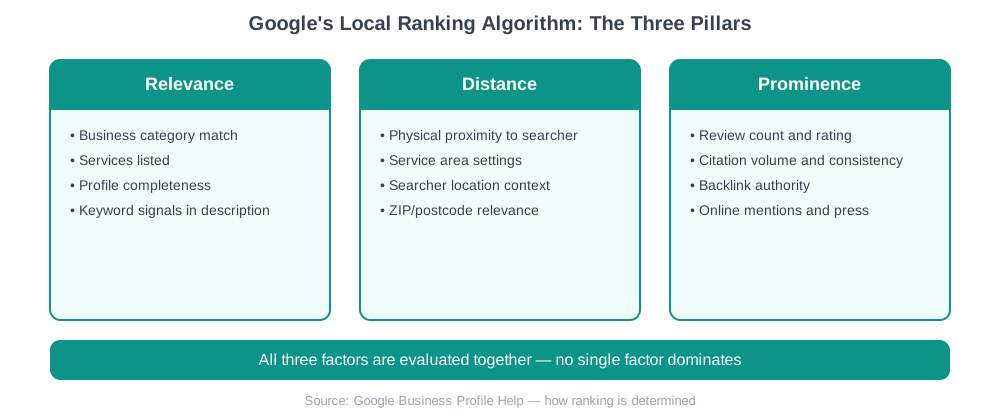
Google evaluates local listings across three documented factors: Relevance, Distance, and Prominence. Understanding how these interact is the foundation for every other optimisation decision you make.
Relevance
Relevance measures how well your business profile matches what a searcher is looking for. It is influenced by your primary and secondary categories, your services list, the keywords present in your business description, and the attributes selected on your profile. A plumber who lists "emergency plumbing", "drain unblocking", and "hot water systems" as services will rank for more specific queries than one with just "plumber" in their category and nothing else.
The most common relevance mistake is selecting a single primary category and leaving all secondary categories empty. Google allows up to 10 categories. Use them. Check what categories your top-ranking competitors use by inspecting their GBP listings, then add any relevant ones you have missed.
Distance
Distance is the physical or logical gap between the searcher and your business location. When a user searches without a location qualifier ("dentist near me"), Google infers distance from their device GPS or IP address. When they search with a location ("dentist Melbourne CBD"), Google uses the named location as the reference point.
You cannot change your address to game distance, but you can influence it through your service area settings. Service-area businesses (tradies, delivery services, mobile consultants) should define their service area to include every suburb they actively serve. Avoid overstating the service area. Google's algorithm down-weights listings whose service area extends far beyond where they have customer signals (reviews, citations, calls).
Prominence
Prominence is the most complex and the hardest to control quickly. It reflects how well-known and trusted your business is across the web. Key prominence signals include:
- Total review count and average star rating on GBP
- Review volume and recency (a business receiving one review per week ranks better than one with 200 reviews all from 2019)
- Citation volume across directories, with consistent NAP (Name, Address, Phone)
- Backlinks from local and industry-relevant websites
- Mentions in local media and news sources
- Your organic website ranking for local queries (the two systems feed each other)
Key Insight
Prominence is the only factor where a business farther away can outrank one that is closer. A dentist 3km from the searcher with 400 reviews and 50 citations can outrank a dentist 500m away with 12 reviews and no citations.
Local Algorithm Updates to Know
Google's local algorithm has had several major confirmed updates since 2021. The Vicinity Update (December 2021) significantly increased the weight given to physical proximity, reducing the advantage of keyword-stuffed business names. The Reviews Update cycles affect how Google weighs review sentiment alongside star ratings. Post-Vicinity, keyword stuffing in business names (e.g. "Smith Plumbing Sydney Emergency 24/7 Repairs") is both a ranking risk and a TOS violation that can trigger suspension.
GBP Completion and Core Features Worth Using
Google's own data shows that businesses with complete profiles are 70% more likely to attract location visits than those with incomplete ones. Profile completeness is not just a checkbox exercise. It directly feeds the relevance factor.
The Completeness Checklist
Business name (exact legal or trading name, no keyword stuffing)
Primary category (most specific available) + all relevant secondary categories
Full address or accurate service area for mobile businesses
Local phone number (not a 1300/1800 number as primary)
Website URL pointing to the most relevant landing page
Business description: 750 characters, keyword-rich, entity-complete, no spam
Opening hours including public holidays and special hours
Services and products with descriptions and prices
10+ high-quality photos (exterior, interior, team, product/work samples)
Attributes selected (women-owned, LGBTQ+ friendly, accessible, outdoor seating, etc.)
Booking links or appointment URLs configured
GBP Features That Drive Ranking and Engagement
Beyond the basic profile fields, GBP includes several features that most businesses underuse:
Posts: GBP Posts appear in your Knowledge Panel and in Maps results. They expire after seven days (standard posts) or remain live until you remove them (offers, events). Businesses that publish at least one post per week see measurably higher profile views. Posts should include a keyword-rich headline, a clear CTA, and a photo. Do not treat them like social media captions. Write for intent.
Q&A: The Questions & Answers section is publicly visible and can be seeded by the business owner. Populate it with the 8-10 most common questions your customers ask, and answer them yourself before competitors or random users do. Unanswered questions filled in by strangers are a frequent source of misinformation in GBP profiles.
Products and Services: These sections feed Google's understanding of what your business offers. List every service you want to appear for. Use the service descriptions to include related keywords naturally. A roofing company that lists "roof repairs", "gutter replacement", "roof restoration", "leaking roof repair", and "tile roof re-pointing" will have broader relevance coverage than one that lists just "roofing".
Messaging: Turning on messaging allows customers to contact you directly through GBP. Google monitors response rates and response times. A median response time under 24 hours is the threshold Google uses to show the "Responds quickly" badge, which increases conversion rates.
Photos and Videos: Google confirms that businesses with photos receive 42% more direction requests and 35% more website visits. Use real photos, not stock. Upload a 360-degree interior view if your business has a physical space. Photo captions are indexed: name your photos descriptively when uploading via the API or desktop dashboard.
Review Management and Response Strategies
Reviews are simultaneously a ranking signal, a conversion factor, and a reputation asset. The three metrics that matter most are: total review count, average star rating, and review velocity (the rate of new reviews per month). A business with 300 reviews but none in the past six months will underperform a competitor with 80 reviews, all from the past 90 days.
Building Review Velocity: Ethical Strategies
Google prohibits incentivising reviews (discounts, gifts, or freebies in exchange for leaving a review). The risk of violation is account suspension. Effective ethical strategies include:
- Review request timing: Ask immediately after a positive service experience, not days later when the emotional peak has passed. A follow-up SMS or email within 2 hours of job completion converts 3-5x better than one sent 48 hours later.
- Short review links: Go to your GBP dashboard, copy your review link (Business Profile > Get more reviews), and shorten it. Include it in email signatures, follow-up messages, receipts, and packaging.
- Staff training: If your team interacts with customers, train them to verbally mention reviews at the right moment. "If you're happy with today's service, we'd love a Google review, which really helps our small business."
- Review cards: Physical NFC-enabled cards and QR code cards (under $30 from suppliers on eBay or Etsy) allow customers to tap or scan and reach your review page instantly. These work particularly well for trades, healthcare, and hospitality.
Response Strategy by Review Type
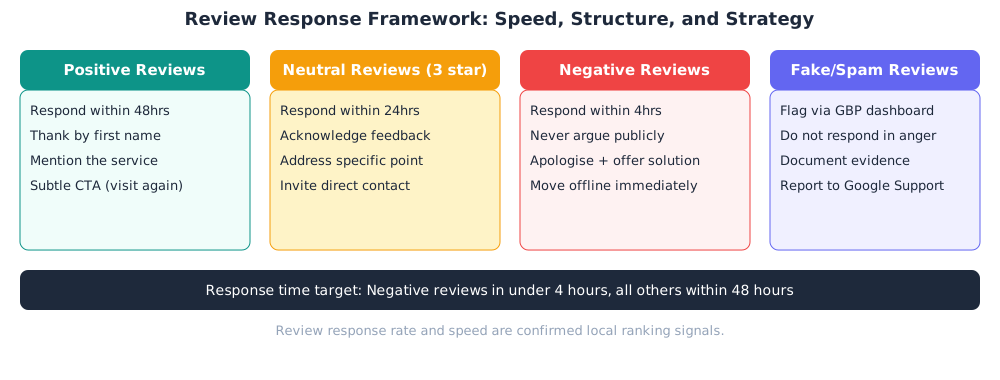
Responding to reviews is a confirmed GBP ranking signal. Target a response rate above 90% across all reviews, and prioritise response speed for negative reviews.
Positive reviews (4-5 stars): Respond within 48 hours. Use the customer's first name if provided. Thank them for the specific service or outcome they mentioned. Add a subtle call to action ("We look forward to seeing you again"). Avoid templated responses. Google's systems and reviewers both detect and penalise them.
Neutral reviews (3 stars): These are often from customers who had a mixed experience. Respond within 24 hours. Acknowledge the specific concern. Offer to resolve it and provide a direct contact method to move the conversation offline.
Negative reviews (1-2 stars): Respond within 4 hours during business hours. Never argue publicly. Never identify the customer by name unless they used theirs. Acknowledge the experience ("I'm sorry this did not meet your expectations"), offer a specific resolution, and invite them to contact you directly. A well-handled negative review response is often more persuasive to prospective customers than a string of five-star reviews.
Fake or spam reviews: Use the GBP dashboard flag function and document the review URL, date, and reason for the dispute. Google's review removal process is slow (typically 4-8 weeks). If the review violates a clear policy (fake identity, competitor spam, offensive content), submit via the Business Profile support team rather than waiting for the automated process.
Warning
Never respond to fake reviews by naming the reviewer or calling them out. Even if you are correct, the public exchange makes your business look litigious. Keep all dispute resolution inside the GBP reporting system.
Citation and Link Building for Local SEO
A citation is any online mention of your business's Name, Address, and Phone number (NAP). Local citations appear in structured form on directory listings (Yellow Pages, Yelp, True Local) and in unstructured form in news articles, blog posts, and forum discussions. Both types contribute to Google's prominence assessment. Keeping your NAP information consistent across every source is foundational to citation authority.
Tier 1: Core Listings (Build These First)
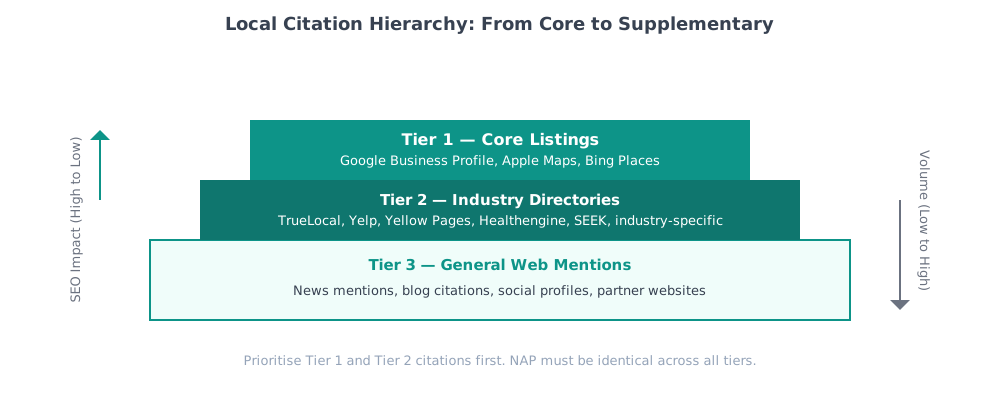
Tier 1 citations carry the most weight and should be completed before investing time in any other directories. In the Australian market, the core Tier 1 citations are:
| Directory | Type | Verification | Notes |
|---|---|---|---|
| Google Business Profile | Primary | Postcard / Video | The foundation. All other citations support this one. |
| Apple Maps / Apple Business Connect | Primary | Email / SMS | Powers all Siri local queries on iOS devices |
| Bing Places for Business | Primary | Phone / Email | Feeds Microsoft Bing, Cortana, and LinkedIn local data |
| Facebook Business Page | Secondary | High domain authority; often ranks for brand queries | |
| Yellow Pages Australia | Secondary | Phone | Legacy but still widely crawled by aggregators |
| True Local | Secondary | Reviews carry weight; aggregator for many directories |
Tier 2: Industry-Specific Directories
Tier 2 citations come from directories relevant to your specific industry or service category. These carry strong topical authority signals. Examples by industry:
- Healthcare: Healthengine, HotDoc, Whitecoat, AHPRAlookup
- Legal: LawConnect, FindLaw Australia, Law Society directories
- Trades: Hipages, ServiceSeeking, Oneflare, Housing Industry Association
- Hospitality: TripAdvisor, OpenTable, Zomato, The Fork
- Childcare and Education: StartingBlocks, My Community Directory
- Real Estate: Realestate.com.au, Domain, Rate My Agent
- Automotive: carsales.com.au, Drive, AussieAutoTrader
NAP Consistency: The Non-Negotiable
Every citation must use identical NAP data. "Smith Plumbing Pty Ltd" and "Smith Plumbing" are different strings. "03 9123 4567" and "(03) 9123-4567" are different strings. "Level 1, 123 Collins St" and "123 Collins Street, Level 1" are different strings. Google's citation reconciliation algorithm treats inconsistencies as conflicting data points, which reduces the confidence score assigned to your entity record.
Audit your existing citations using a tool like BrightLocal or Whitespark before building new ones. Fix inconsistencies first. Building new citations on top of a broken NAP foundation compounds the problem.
Local Link Building Opportunities
Links from locally relevant websites carry a prominence signal that citations cannot. Specific opportunities:
- Local Chamber of Commerce: Most Australian chambers (Melbourne Chamber of Commerce, Business SA, ACCI) maintain member directories with do-follow links. Membership fees typically run $200-600/year.
- Supplier and partner pages: If you are an authorised dealer, installer, or partner of a larger brand, request a listing on their "find a dealer" page.
- Local sponsorships: Sponsoring a local sports club, school event, or community festival typically yields a link from the organisation's website.
- Local news and media: Contribute expert commentary to local news outlets (suburb-level Facebook groups run by journalists, local papers, council newsletters). These generate unstructured citations and occasionally backlinks.
- Neighbourhood blogs and community sites: Suburb-specific WordPress blogs, local Buy Nothing groups, and neighbourhood association sites all carry local relevance signals even at low domain authority.
Suburb-Level Keyword Research and Targeting
Most local SEO keyword research stops at city level ("dentist Melbourne", "plumber Sydney"). The highest-converting local queries are suburb-level because searchers using suburb modifiers are typically further along their decision journey. "Emergency plumber Fitzroy North" converts at a significantly higher rate than "emergency plumber Melbourne".
Building Your Suburb Keyword Matrix
Start with your primary service categories and map them against every suburb in your service area. For a business serving 20 suburbs with 8 core services, the keyword matrix has 160 base combinations. Then add query modifiers:
- Intent modifiers: "near me", "open now", "same day", "emergency", "affordable", "best"
- Service qualifiers: "for seniors", "for kids", "for commercial", "for apartments"
- Landmark and precinct modifiers: "near Crown Casino", "CBD", "inner suburbs", "North Side"
Use Google Search Console (filter by suburb queries), Google Autocomplete (type "[service] [suburb]" and note the suggestions), and Google's "People Also Ask" boxes for the highest-volume combinations to prioritise first.
Where to Deploy Suburb Keywords
Keywords used only on your GBP listing are insufficient. Deploy suburb-level keywords across:
- GBP business description: Mention the 3-5 core suburbs you serve in a natural sentence ("We serve clients across Fitzroy, Carlton, Collingwood, and Northcote").
- GBP services descriptions: Include suburb references in service descriptions where natural.
- GBP posts: Rotate suburb-specific posts ("Now serving new clients in Richmond, call today").
- Website landing pages: For high-value suburban markets, build dedicated suburb pages on your website (e.g. /plumber-fitzroy, /plumber-carlton). Each page must have unique content, not a template with the suburb name swapped in. Thin suburb pages trigger duplicate content issues and can damage your overall site authority.
- Review responses: Mention the suburb naturally in responses where the customer referenced it ("Thank you for the kind words about our work in South Yarra").
Critical
Do not create suburb landing pages with fewer than 400 words of unique content, or with content that is 90%+ identical across pages. Google's Helpful Content system identifies and algorithmically demotes thin location page farms. Each suburb page must justify its existence with genuinely unique information: local knowledge, project examples, suburb-specific FAQs, or locally relevant partner links.
Schema Markup for Local Businesses
Schema markup implements the Entity-Attribute-Value model that search engines use to understand your business as a structured object, not just text on a page. For local businesses, the primary schema types are LocalBusiness, its many subtypes (e.g. Dentist, Plumber, Restaurant), and supporting types like PostalAddress, GeoCoordinates, OpeningHoursSpecification, and AggregateRating.
Minimum Viable LocalBusiness Schema
<!-- JSON-LD LocalBusiness schema, place in <head> or before </body> -->
<script type="application/ld+json">
{
"@context": "https://schema.org",
"@type": "Plumber",
"name": "Smith Plumbing Pty Ltd",
"url": "https://smithplumbing.com.au",
"telephone": "+61-3-9123-4567",
"address": {
"@type": "PostalAddress",
"streetAddress": "123 Collins Street",
"addressLocality": "Melbourne",
"addressRegion": "VIC",
"postalCode": "3000",
"addressCountry": "AU"
},
"geo": { "@type": "GeoCoordinates", "latitude": -37.8136, "longitude": 144.9631 },
"sameAs": [
"https://www.facebook.com/smithplumbing",
"https://www.linkedin.com/company/smith-plumbing",
"https://www.yellowpages.com.au/listing/smith-plumbing"
],
"aggregateRating": {
"@type": "AggregateRating",
"ratingValue": "4.9", "reviewCount": "187"
}
}
</script>
The sameAs array is the most underused field in local business schema. It links your entity to its external profiles, allowing Google's Knowledge Graph to merge data from multiple authoritative sources into a single, higher-confidence entity record. Add every verified directory profile you have.
Beyond LocalBusiness, add FAQPage schema to pages with Q&A content, Review schema if you are displaying reviews on your site, and BreadcrumbList schema to your navigation hierarchy. Validate every schema block with Google's Rich Results Test before publishing.
Mobile and Voice Search Optimisation for Local Queries
More than 60% of all local searches originate from mobile devices, and a growing proportion of those are voice queries delivered to Google Assistant, Siri, or Alexa. Voice search changes the syntax of queries from fragmented keywords to full conversational sentences.
Typed query: "best dentist Melbourne CBD"
Voice query: "Who is the best dentist near Melbourne CBD that's open on Saturdays?"
The semantic intent is identical, but the structure is different. Voice queries are typically:
- Longer (5-10 words vs 2-4 words for typed queries)
- Question-based (Who, What, Where, When, How)
- Conversational and grammatically complete
- Intent-qualified (open now, near me, that accepts Medicare, that delivers)
Optimisation Strategies for Voice and Mobile Local
- FAQ content on your website: Voice search answers almost always come from FAQ-structured content. Add a FAQ section to each service page and your homepage, with questions phrased exactly how a customer would speak them.
- Mobile page speed: Local mobile searches have a high exit rate when pages load above 3 seconds. Run Google's PageSpeed Insights on your key landing pages. Core Web Vitals (Largest Contentful Paint under 2.5s, INP under 200ms, and Cumulative Layout Shift below 0.1) are direct ranking signals.
- Click-to-call prominence: Your phone number must be a tappable link on mobile (
<a href="tel:+61312345678">). Place it in the header and above the fold on mobile layouts. GBP direction and call click-through rates are engagement signals. - Opening hours accuracy: Voice assistants pull opening hours directly from GBP. Outdated hours are a conversion killer. Update your GBP special hours for public holidays at least two weeks in advance, as Google caches this data.
Local SEO Audit: Processes and Key Metrics
A local SEO audit is a systematic review of every factor that affects your ranking and conversion in local search. Run a full audit quarterly. Run a partial audit (GBP metrics only) monthly.

Audit Process
GBP Profile Audit
Check every field for completeness and accuracy. Verify categories match competitor listings. Confirm all photos are displaying. Check that services and products are listed. Review Q&A for unanswered or incorrect responses.
NAP Consistency Audit
Export all citations from BrightLocal, Whitespark, or Moz Local. Identify any listing with a different spelling, phone number, or address format. Flag duplicates for removal or merging.
Review Audit
Calculate your review velocity (reviews per month). Calculate your response rate. Check average star rating against the top 3 competitors in your primary suburb. Identify any negative reviews without a response.
Ranking Audit
Use a local rank tracker (BrightLocal, Local Falcon, Bright Data) to check your Map Pack visibility across a grid of your service area. A 7x7 or 9x9 grid gives you suburban-level visibility heat mapping. Identify underperforming suburbs.
Website Technical Audit
Check page speed on mobile and desktop. Verify schema markup is valid. Confirm canonical tags on suburb landing pages. Check internal linking from the homepage to suburb pages. Run a crawl to identify broken links or 404s.
Competitor Gap Analysis
For each top-ranking competitor, check their category count, review velocity, citation sources, and website DA. Document the gaps between your profile and theirs. Prioritise closing the largest gaps first.
Key Metrics to Track Monthly
| Metric | Good | Needs Work | Critical |
|---|---|---|---|
| Average star rating | 4.5+ | 4.0-4.4 | Below 4.0 |
| Review response rate | 90%+ | 60-89% | Below 60% |
| Review velocity (new/month) | 4+ | 1-3 | 0 |
| Profile completeness score | 95%+ | 70-94% | Below 70% |
| NAP consistency across citations | 100% | 90-99% | Below 90% |
| Map Pack visibility (primary suburb) | Top 3 | 4-7 range | Not appearing |
| Direction requests (month on month) | +5% growth | Flat | Declining |
Multi-Location SEO and Competitive Analysis
Multi-Location Strategy
Businesses with multiple locations must create a separate, verified GBP listing for each physical location. Each listing should have its own unique phone number (not a shared 1300 number), its own address, its own set of photos showing that specific location, and its own review profile. Locations sharing identical content, phone numbers, or photos are candidates for deduplication or suspension by Google's quality algorithms.
Key rules for multi-location management:
- No cannibalisation: Do not target the same suburb keywords from two different location pages on your website. Assign each suburb to the nearest location. Use geo-targeted landing pages and internal linking to direct search engines to the correct location for each suburb.
- Centralised review management: Use a platform like BrightLocal or Yext to monitor and respond to reviews across all locations from a single dashboard. Response rate drops significantly when review management is decentralised across location managers.
- Location group in GBP: Create a location group in Google Business Profile Manager to manage all locations under one account. This enables bulk editing, bulk photo uploads, and centralised performance reporting.
- Consistent branding: All locations should use the same business name format (e.g. "Smith Dental Fitzroy" and "Smith Dental Carlton", not "Smith Dental" for one and "Smith's Dental Clinic" for another). Inconsistent naming fragments the entity authority signal across the location group.
Competitive Analysis for Local Markets
Local competitive analysis differs from organic competitive analysis because the competitive set is geographically bounded. Your direct competitors are the businesses appearing in the Local Pack for your target queries, not necessarily the businesses with the highest domain authority.
The practical competitive analysis process for local SEO:
- Search your 5-10 primary target queries from an incognito browser in the target location. Screenshot the Local Pack results for each query.
- For each competitor appearing in the Pack, check: review count, average rating, review velocity (last 10 reviews with dates), category count, and profile completeness.
- Check their website DA using Ahrefs, Moz, or Semrush. Check the number of referring domains linking to their local pages.
- Check their citation footprint using BrightLocal's competitor citation finder. Identify directories they are listed on that you are not.
- Document your gap on each dimension. Sort by effort-to-impact ratio. Prioritise closing the gaps where the effort is lowest relative to the potential ranking gain.
Practical Benchmark
In most Australian capital city suburban markets, the minimum threshold to rank in the Local Pack top 3 is: 50+ reviews with an average above 4.3, consistent NAP across at least 30 citation sources, and a website with at least 20 referring domains from Australian websites. Markets with lower competition (regional cities, niche trades) may require significantly less.
Penalty Identification, Recovery, and Seasonal Trends
GBP Suspension and Penalty Identification
GBP listings can be suspended for several reasons: a change of address to a PO box or virtual office, a business name that includes keywords not in your registered trading name, a sudden influx of fake reviews, or a competitor-initiated spam report. Soft suspensions remove the listing from Maps but keep it in the GBP dashboard. Hard suspensions remove it from both.
Signs of a penalty or suspension:
- Your listing disappears from Maps search results but is still visible in your GBP dashboard
- A "This listing has been suspended" banner in the GBP dashboard
- A sudden and unexplained drop in GBP impressions, direction requests, and call clicks
- Your listing is still showing but in a significantly lower rank than normal following a known algorithm update
Recovery Process
For hard suspensions, submit a reinstatement request via the GBP support portal with business legitimacy documentation: ABN certificate, lease agreement or utility bill matching the listed address, and a signed declaration confirming compliance with GBP guidelines. Recovery typically takes 2-6 weeks. If the first reinstatement request is rejected, appeal via the GBP Community Help Forum, where Google moderators with escalation access monitor this channel.
For organic ranking drops following an algorithm update, run a full audit against the known update's focus area. The December 2021 Vicinity Update hit keyword-stuffed business names. The Reviews Update cycles target review manipulation. The core algorithm updates penalise low-quality website content supporting the GBP listing. Address the documented issue and allow 4-8 weeks for the algorithm to re-evaluate your profile.
Seasonal Trends and Local Search Planning
Local search demand follows strong seasonal patterns that vary by industry and location. Planning content, promotions, and profile updates in advance of seasonal peaks is a competitive advantage that most businesses neglect until the peak arrives.
| Industry | Peak Season (Australia) | Pre-Season Action (6 weeks prior) |
|---|---|---|
| HVAC / Air Con | Nov-Feb (summer), May-Jun (winter) | GBP Posts with seasonal offers; update services list; increase review requests |
| Retail / Gifts | Nov-Dec (Christmas) | Add seasonal products to GBP; enable offers posts; update opening hours |
| Landscaping / Gardens | Aug-Oct (spring) | Create suburb-specific seasonal content; GBP photo updates of spring work |
| Accountants / Tax | Jun-Jul (EOFY) | FAQ content for tax season queries; GBP posts on EOFY services |
| Dental | Jan-Feb, Jun-Jul (school breaks) | Promote family/children check-ups; update appointment booking link |
| Real Estate | Mar-Apr, Sep-Oct (auction season) | Suburb market reports as GBP posts; update sold listings as photos |
Use Google Trends (set to "Australia" and filter to the past 5 years) to visualise seasonal demand cycles for your primary service keywords. Build a 12-month content and promotions calendar based on these peaks, with content creation and GBP post preparation happening 6-8 weeks before each anticipated demand spike.
Tools, Social Media Integration, and ROI Reporting
Essential Local SEO Tools
| Tool | Primary Use | Cost (approx.) | Best For |
|---|---|---|---|
| BrightLocal | Citation audits, rank tracking, review monitoring | $39-$99/mo | SMBs managing 1-5 locations |
| Local Falcon | Map Pack grid rank tracking | $20-$100/mo | Visualising suburb-level ranking heat maps |
| Whitespark | Citation building, local rank tracking | $17-$70/mo | Deep citation research and building |
| Google Search Console | Organic query data, crawl errors | Free | Identifying suburb keyword opportunities |
| Google Business Profile (Insights) | GBP engagement metrics | Free | Direction requests, call clicks, photo views |
| Semrush (Local add-on) | Competitor analysis, citation management | $50+/mo | Agencies managing multiple clients |
| GatherUp / Podium | Review request automation | $99-$300/mo | Businesses needing high-volume review generation |
Not suitable for: Businesses with a single location and a small budget do not need both BrightLocal and Whitespark. Start with BrightLocal for the integrated citation/rank tracking dashboard, then add Whitespark specifically if you need deep citation building in a competitive niche.
Local Social Media and Its SEO Benefits
Social media does not directly affect GBP rankings, but it influences several of the signals that do:
- Review generation: Facebook and Instagram posts reminding followers to leave a Google review are one of the most effective (and underused) review velocity strategies. A post with your Google review link pinned in the comments generates consistent trickle reviews with minimal effort.
- Citation signals: A verified Facebook Business Page is a Tier 2 citation. It ranks for branded searches, shows your contact details, and feeds citation aggregators that distribute your NAP data to hundreds of smaller directories.
- Brand search volume: Consistent social media activity increases brand name search volume. Branded search volume is an indirect prominence signal. Businesses people search for by name are treated as more authoritative than those that only appear in category searches.
- Content amplification: Local social media groups (suburb Facebook groups, Nextdoor neighbourhoods) are effective amplifiers for local content. A post about a local sponsorship, a community event, or a locally relevant service can generate shares that build unstructured citations naturally.
ROI Measurement and Local SEO Reporting
The core challenge in local SEO reporting is connecting GBP activity to business outcomes. The direct metrics available from GBP Insights (direction requests, call clicks, website visits, and photo views) are leading indicators of intent, not lagging indicators of revenue.
Build a local SEO reporting framework with two layers:
Layer 1: Activity metrics (weekly). GBP profile views, search impressions, direction requests, call clicks, website clicks. These tell you whether your profile is being found and engaged with.
Layer 2: Outcome metrics (monthly). Inbound calls (matched against GBP call tracking data), form submissions from suburb landing pages (tracked via UTM parameters or a dedicated local page), new customer acquisition attributed to local search (CRM tagging at point of enquiry), and revenue from those customers.
Connect GBP call click data to a call tracking number (e.g. via CallRail or Delacon in the Australian market) to measure whether GBP call clicks convert to actual conversations. A GBP profile generating 200 call clicks per month but a 10% pickup rate has a different ROI than one generating 80 clicks with 70% pickup.
The simple local SEO ROI formula:
// Monthly Local SEO ROI
ROI = (New Revenue from Local Search − Monthly SEO Cost) ÷ Monthly SEO Cost × 100
// Example: ($8,500 revenue − $1,200 cost) ÷ $1,200 × 100 = 608% ROI
Track this monthly for a minimum of 6 months before drawing conclusions about campaign performance. Local SEO attribution is inherently imperfect. A customer may discover you via GBP, visit your website, see a Facebook ad, and then call three weeks later. Attribution models that credit only the last touchpoint will systematically undervalue GBP's contribution.
Industry-Specific Local SEO Considerations
The fundamentals above apply across all industries, but several sectors have constraints, opportunities, and regulatory considerations that require specific approaches.
Healthcare (Medical, Dental, Allied Health)
AHPRA regulations prohibit testimonials, patient reviews that identify the nature of treatment, and any advertising that makes unverifiable health outcome claims. This does not prohibit Google reviews. It restricts how you display and respond to reviews on your own website and marketing materials. On GBP, patient reviews are user-generated content that you cannot legally solicit but also cannot suppress. Your response strategy must avoid confirming whether the reviewer is a patient (this would breach privacy regulations). A safe response format: "Thank you for your kind feedback. We're pleased your experience with our clinic was positive."
Medicare and private health fund coverage information should appear in your GBP attributes, services list, and schema. "Bulk billed", "HICAPS available", and "DVA accepted" are high-intent qualifier phrases that many healthcare GBP profiles omit. Dental practices should also list health fund acceptance (Medibank, Bupa, HCF) and indicate whether they accept new patients.
Legal Services
Law Society rules vary by state in Australia. In most jurisdictions, solicitors can receive and display client reviews, but cannot make comparative claims ("best lawyer in Melbourne") or guarantee outcomes. Schema for legal services should use the Attorney or LegalService type with areaServed and knowsAbout properties populated with practice area terms. Reviews mentioning specific case types or outcomes should be treated carefully. Confirm with your PI insurer what can be responded to publicly.
Trades and Home Services
Trades are highly competitive in GBP because the search intent is transactional and time-sensitive. Differentiation comes through response speed (messaging and call response time), credentials (licence numbers visible in your profile description, plumber's licence, electrical licence number), and before/after photo quality. Platforms like Hipages and ServiceSeeking generate reviews independently of GBP. Use these platforms to build review volume and then reference them in your GBP description to build cross-platform authority signals. See our full guide to tradie local SEO for a complete GBP and citation strategy tailored to trade businesses.
Hospitality and Food Service
GBP for restaurants should have menu integration enabled (Google can display your menu directly in the Knowledge Panel). Update the menu at least quarterly, and ensure pricing is accurate, since incorrect prices in GBP menus generate negative reviews. Reservation booking integration (via OpenTable, The Fork, or a direct booking link) is a conversion multiplier: customers who can book directly from the GBP result have a significantly higher conversion rate than those directed to a website to find a booking form. Photos of food, atmosphere, and the front exterior should be refreshed with each season.
Professional Services (Accounting, Finance, Consulting)
Professional services businesses often struggle with review generation because clients consider the relationship confidential. The solution is to ask for reviews on general service quality, not on the specific work delivered. "Would you recommend our team for their responsiveness and professionalism?" is a lower-barrier question than "Would you review the tax advice we provided?" Schema for accounting and financial services firms should use ProfessionalService with hasCredential linking to professional body registrations (CPA Australia, ASIC, FPA) and areaServed specifying the service regions.
Need help with your local SEO strategy?
From GBP optimisation and citation audits to suburb-level keyword strategies and multi-location management, our Google Business Profile optimisation service and broader local SEO team implement everything covered in this guide. We work with trades, healthcare, professional services, and hospitality businesses across Australia.
Frequently Asked Questions
How long does it take to rank in the Google Local Pack?
For a new listing in a low-to-moderate competition suburb, initial Local Pack visibility can appear within 4-8 weeks of full profile completion and citation building. For competitive categories in major capital city suburbs (dentists, plumbers, accountants in Melbourne or Sydney CBDs), ranking in the top 3 typically requires 3-6 months of sustained review generation, citation building, and content development on the supporting website. Businesses in high-competition niches with no existing online presence should plan for 6-12 months before achieving stable top 3 positions.
Does having more Google reviews than competitors guarantee a higher ranking?
No. Review count is one of several prominence signals, not a deterministic ranking factor. A business with 500 reviews but a 3.8 average rating, poor NAP consistency, and a low-authority website will often rank below a competitor with 80 reviews, a 4.8 average, and strong citation coverage. Review quality (rating, recency, response rate, and content of review text) matters as much as total count. Google's local algorithm weighs the entire prominence profile, not individual metrics in isolation.
Can a service-area business (no physical storefront) rank in the Local Pack?
Yes. Service-area businesses (SABs), including plumbers, electricians, mobile consultants, and cleaning services, can rank in the Local Pack by hiding their address in GBP and defining a service area instead. The Vicinity Update (December 2021) made distance from the searcher more significant, which can disadvantage SABs that list their home suburb as the base location but serve suburbs 30km away. The practical fix is to ensure review signals, citations, and suburb-level website content exist for the target suburbs, not just the home base suburb.
What is the difference between a GBP suspension and a ranking drop?
A suspension means Google has removed your listing from Maps results pending review. A ranking drop means your listing still exists but is appearing lower in results, typically after an algorithm update or because competitors have improved their profiles faster than you have. To identify which has occurred: search your business name in Maps. If the listing does not appear at all, it may be suspended. Check your GBP dashboard for a suspension notice. If it appears but in a lower position for category queries, it is a ranking shift, not a suspension.
How many categories should I add to my Google Business Profile?
Add as many relevant categories as accurately describe your business, up to Google's current limit (typically 10). Only add categories for services you genuinely offer. The primary category carries the most weight and should be your most specific, highest-value service. Secondary categories extend your relevance to additional query types. Adding irrelevant categories to try to capture unrelated search traffic is a TOS violation and can trigger a spam review. Check your top-ranking competitors' categories via their GBP Knowledge Panel and ensure you are not missing any that apply to you.
Should I use a 1300 or 1800 number as my primary GBP phone number?
No. Google's guidelines and local SEO best practice both recommend using a local geographic phone number (with an area code matching your location) as the primary GBP number. This is because 1300 and 1800 numbers are not geographically anchored, which weakens the location signals Google uses to verify your business's physical presence. If you use a 1300 number for business operations, add the local geographic number as the primary GBP contact and list the 1300 number as a secondary number in your profile or website.
How do I optimise for "near me" searches?
"Near me" queries are resolved by Google using the searcher's device location, not text on your website or profile. The way to rank for "near me" queries is to optimise all the standard local ranking signals: profile completeness, review velocity, citation consistency, and website authority. One specific tactic that helps is to include your physical location in your website's schema markup (using GeoCoordinates in LocalBusiness schema) and to use your location naturally in body copy and FAQ content, since voice and mobile queries that produce "near me" results also crawl page content for location confirmation.

Tharindu Gunawardana
Founder & Director, SearchMinistry Media
Tharindu Gunawardana is the Founder of SearchMinistry Media and a search strategist with 17 years of experience across Sri Lanka, Singapore, and Australia. A former Agency SEO Director, he specialises in helping brands transition from traditional SEO to AI-driven discovery.